One tool for every failed message
When a message lands in a dead letter queue it's a signal that something in your system needs attention. Triage gives engineers and operators a purpose-built interface to find those messages, understand why they failed, fix the payload if needed, and replay them — without anyone needing direct access to the broker.
-
📋Multi-provider — connects to Anypoint MQ, SQS, RabbitMQ, ActiveMQ / Amazon MQ, Azure Service Bus, and Google Pub/Sub from a single interface. One login, all your queues.
-
🔍Non-destructive browsing — messages are locked during inspection and automatically returned if not replayed. Nothing is lost.
-
⚡Transform pipeline — write JavaScript functions to reshape, enrich or re-route payloads before they're replayed downstream.
-
🤖AI-powered diagnosis — opt-in feature: supply your own API key for a supported LLM provider (Anthropic, OpenAI, or any compatible model) and have it analyse the message body and attributes to explain the likely failure cause and recommend a fix. No data is sent unless explicitly triggered.
-
🔔Depth alerts — fire when a DLQ exceeds a threshold for a sustained period. Delivers to webhooks, SNS, or OpenTelemetry.
-
🔐No direct broker access required — broker credentials stay on the server. Staff authenticate with their own identity and get only the capabilities their role allows.
-
🔗Message tracing — every replayed message carries a root correlation ID. The trace timeline reconstructs the full journey across providers, storage, and federated instances. Optional OTEL span export sends the same data to Datadog, Grafana, or any OTLP backend.
-
🌐Federation — link multiple Triage instances over mTLS so operators get a unified topology view across all environments.
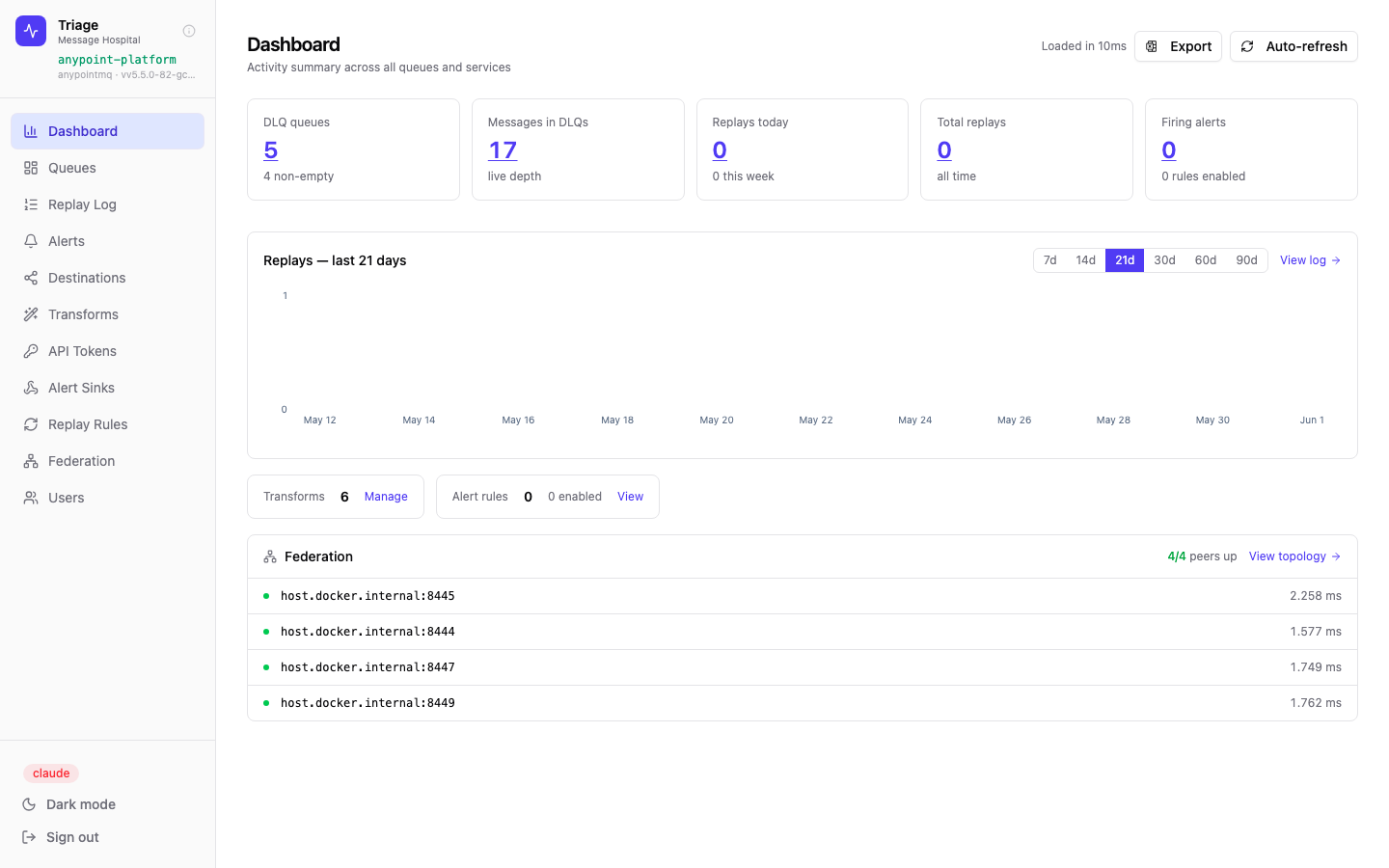
The dashboard shows live DLQ depth, replay history, and federation peer health at a glance.
Remove direct broker access — without removing capability
The standard approach to handling production DLQ failures is to give developers and support staff direct access to the broker. In Anypoint MQ that means platform user accounts or service credentials with permissions to access broker components — granting read and write access to every queue in the environment. Triage eliminates that exposure entirely.
-
✕Developers hold direct Anypoint MQ access — platform accounts or service credentials that reach every queue, not just the one they need
-
✕Credentials shared informally via Slack, Confluence pages, or team wikis — no visibility into who has them
-
✕No audit trail — no record of who read which message or triggered a replay
-
✕Support staff get over-privileged access to handle incidents — it's the only way to give them any access at all
-
✕Leavers retain their Anypoint MQ access until someone manually removes their platform account or rotates shared credentials
-
✕Payload edits during replay happen ad-hoc in scripts or tooling with no record of what changed
-
✓Anypoint credentials are server-side environment variables — no human ever handles them after initial deployment
-
✓Users authenticate with their own identity (SSO via GitHub, OIDC, or local) — individual accountability, not shared secrets
-
✓Every replay is logged with actor, message ID, queue, transform applied, and timestamp — exportable to CSV
-
✓Support staff get the Viewer role — read messages, search, inspect — with no ability to replay or modify anything
-
✓Application engineers get the Developer role — author and version transform scripts in-app, without replay, configuration, or access to production message payloads
-
✓Revoking a user's Triage account removes all access instantly — the broker credential is untouched and unchanged
-
✓Payload changes only happen through named, attributed transforms — what changed, who wrote it, when it was last updated
Mapping roles to your team
Viewer
Can browse all queues, read message content, and search by body or attributes. Cannot replay, transform, or change any configuration. Safe to give broadly — seeing a message has no side-effects.
Operator
Can replay messages, apply transforms, and manage replay rules. Cannot manage users, create alert sinks, or modify provider configuration. Every replay action is written to the audit log under their identity.
Developer
Authors transform scripts — writes, tests, clones, and versions them — and nothing else. Not a step up from Viewer: no replay, no configuration, and no access to production message payloads, so scripts are tested against samples rather than live traffic. Lets the engineer who owns the fix save it in Triage without being made an admin.
Admin
Full access — manages users, providers, transforms, alert rules, sinks, API tokens, and federation peers. Broker credentials are set at deployment time and never accessible through the UI, even by admins.
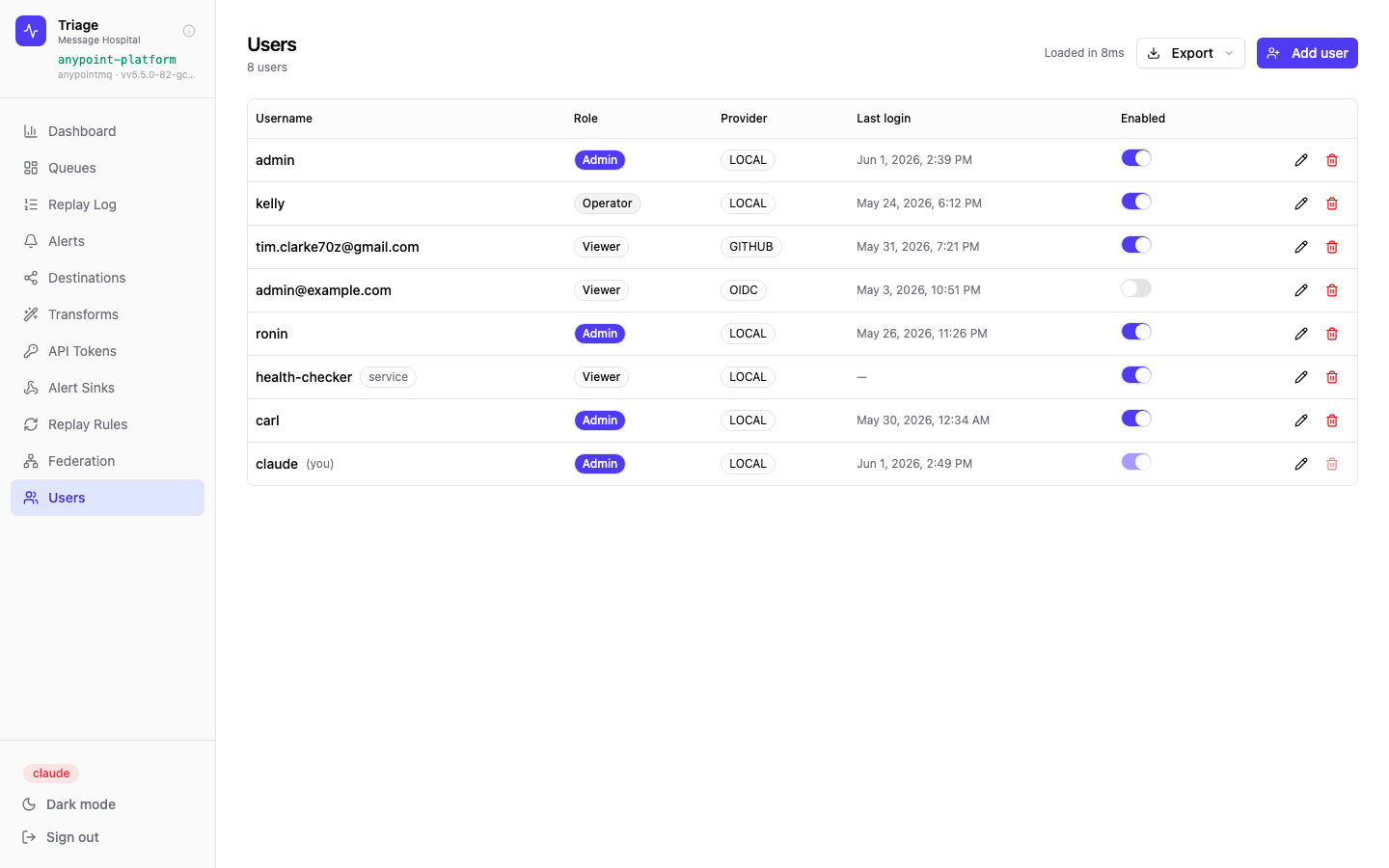
Users are tied to individual identities — Local, GitHub OAuth, or OIDC. Roles are assigned per user. Disabling an account cuts off access immediately; the Anypoint credential is never involved.
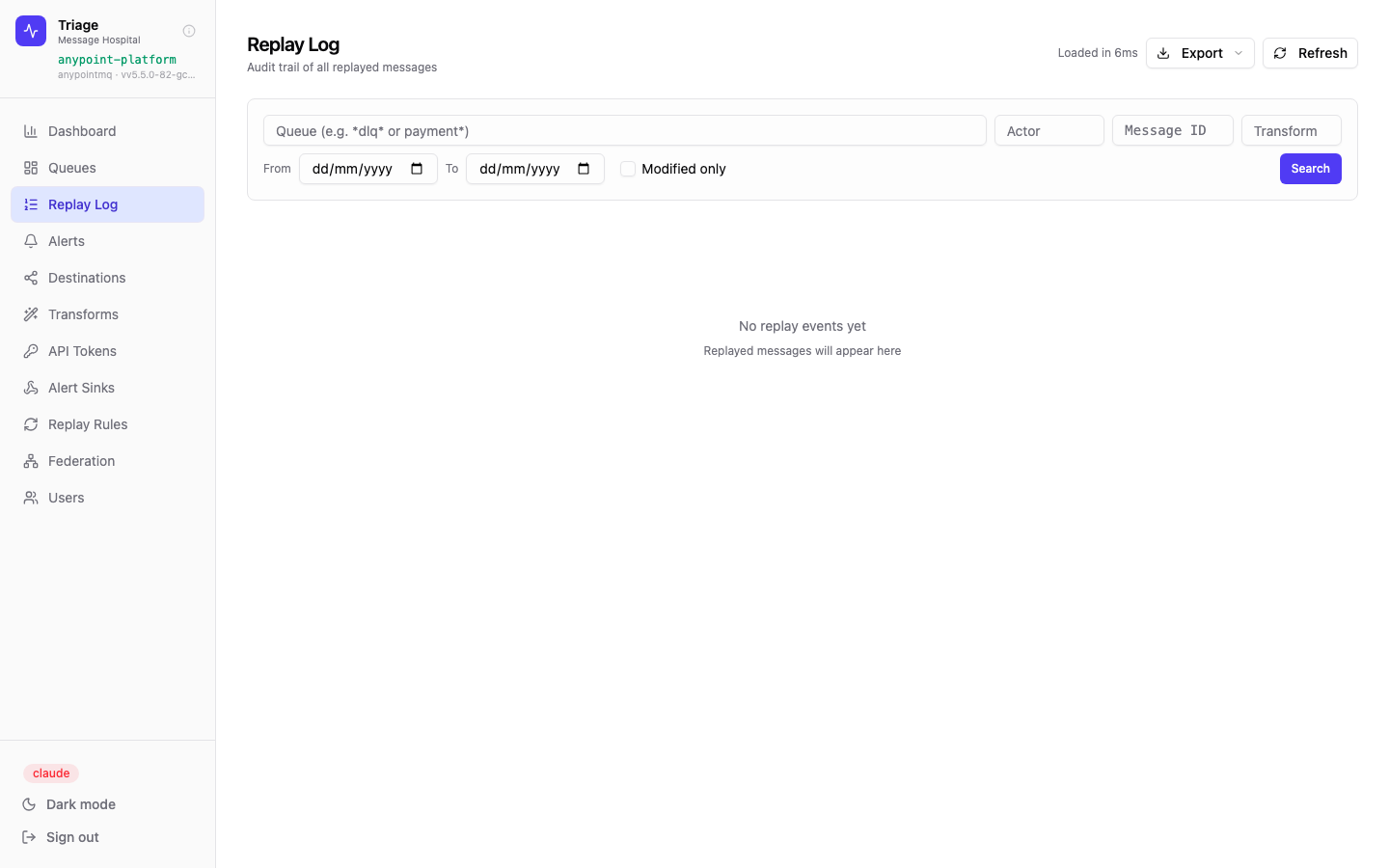
The Replay Log is the immutable audit trail. Every entry records the actor (user or automated rule), the queue, the message ID, the transform applied, and the timestamp. Filtered and exported for compliance reviews.
Protect stored payloads — even from a database breach
The only sensitive payload Triage keeps at rest is the before/after body snapshot on each replay and storage remediation — the data behind the diff, the trace, and the audit log. At-rest volume and RDS encryption protect a stolen disk or backup, but not a live database breach: Postgres decrypts transparently for anyone who can connect. Three opt-in controls govern how — or whether — that payload is persisted, and all three keep the full metadata audit trail.
Encrypt bodies against a live-DB breach
Stored payloads are written as AES-256-GCM ciphertext. The data key lives only in application memory, wrapped at rest by a raw master key or a cloud KMS — AWS KMS, GCP KMS, or Azure Key Vault. Ciphertext dumped from the database is useless without the key. Diffs still work — bodies decrypt at render time — and the key is unwrapped once at startup, so KMS is never on the per-message path.
Don’t persist payloads at all
Audit rows are written without bodies — the payload is dropped at insert time and never touches the database. You keep the full "who remediated what, when, on which queue" record; you give up the before/after diff. The answer for "we can be configured to never store payloads."
Scrub payloads after N days
An hourly, leader-gated job blanks body columns older than N days while keeping the metadata row intact — capping the blast radius of a breach to the last N days without losing the compliance trail. Scoped to the provider names each instance owns, so it never touches a co-tenant’s bodies in a shared database.
Envelope encryption is the only control that keeps the diff and defends a live-DB breach. Cloud KMS key providers require the kms license feature; the raw master-key provider is always available. Redaction and masking are deliberately not offered — they degrade the diff while giving a weaker guarantee than encryption.
Additional compliance controls
Named, attributed transforms
Every payload modification applied during replay is done through a saved transform — with a name, a description, an author, and a last-modified timestamp. There is no path to edit a message ad-hoc in Triage. Compliance teams can query which transform touched which messages via the Modified only filter in the Replay Log.
Scoped API tokens with expiry
Automated systems that need programmatic replay access get API tokens — not the broker credential. Tokens inherit the issuing user's role, carry an explicit expiry date, and can be revoked individually. The token list shows active, expired, and revoked counts across the entire instance.
Read-only share links for externals
External vendors, auditors, or partner teams can be given a time-limited share link to view a topology graph. They see queue and exchange names — nothing else. No message data, no replay capability, no Triage account required, and the link stops working at expiry.
Non-destructive message access
Browsing a queue in Triage locks messages temporarily — they are invisible to consumers while being inspected, then automatically returned to the queue if not replayed. There is no way to accidentally consume or lose a production message through the inspection workflow.
First-class MuleSoft Anypoint MQ support
Triage integrates directly with the MuleSoft Anypoint MQ XAPI to enumerate exchanges, queues, and dead letter queues across all environments — with zero configuration beyond a client ID and secret.
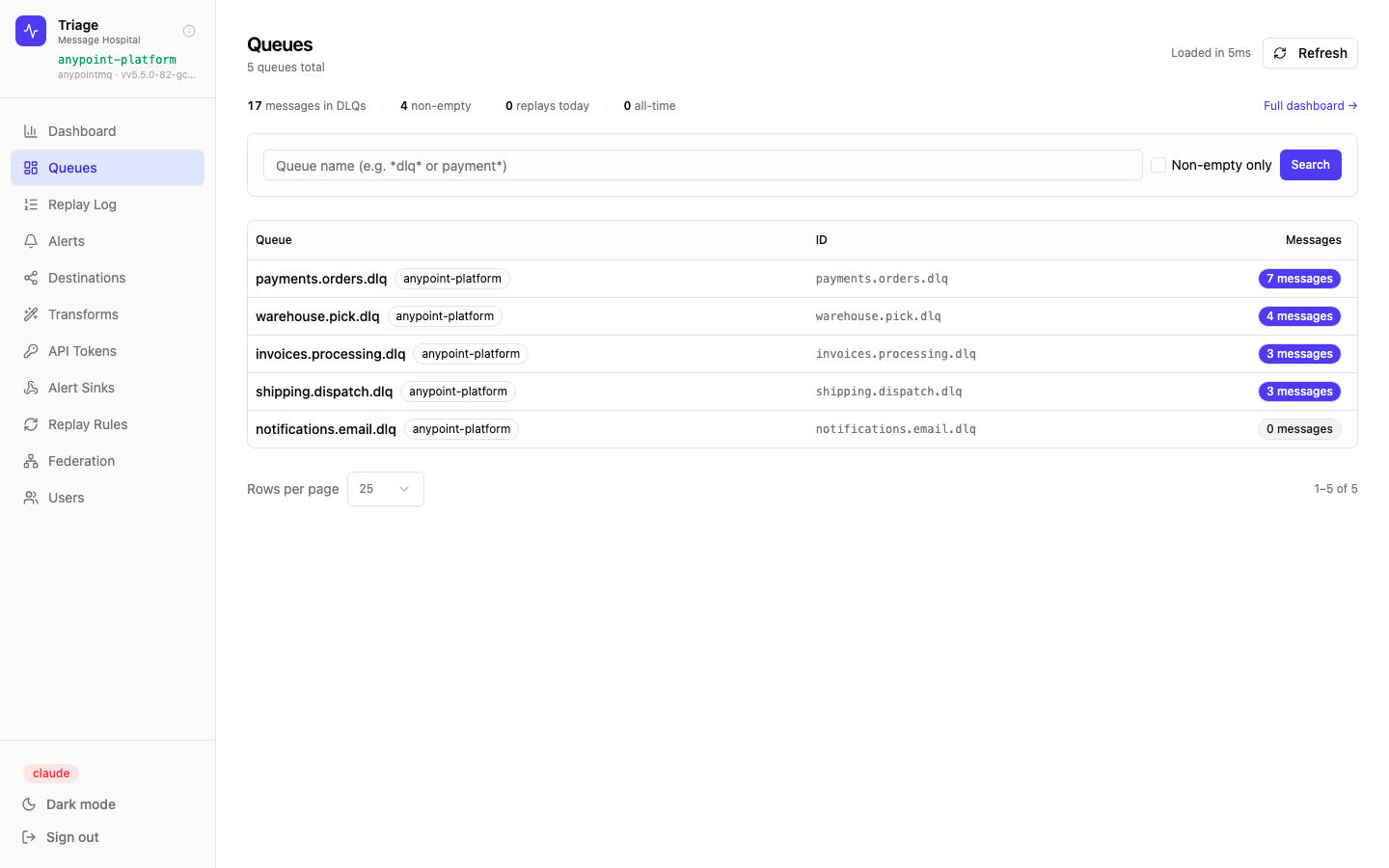
Queue browser showing 5 Anypoint MQ DLQs — all automatically detected via the XAPI. The provider tag confirms the source.
How it works
-
✦DLQ auto-detection — the Anypoint XAPI exposes the DLQ relationship for each queue. Triage reads this metadata to automatically classify queues, no manual tagging needed.
-
✦2-minute lock TTL — Anypoint MQ locks messages for 2 minutes during peek. Triage tracks the lock ID and sends heartbeats to keep it alive while you're browsing, automatically releasing on close.
-
✦Exchange topology — Triage reads Anypoint exchange-to-queue bindings and renders the full routing graph, showing which exchanges feed which queues and their DLQs.
-
✦Message attributes — all Anypoint MQ message properties (contentType, lockId, messageId, custom headers) are surfaced alongside the payload in the inspection view.
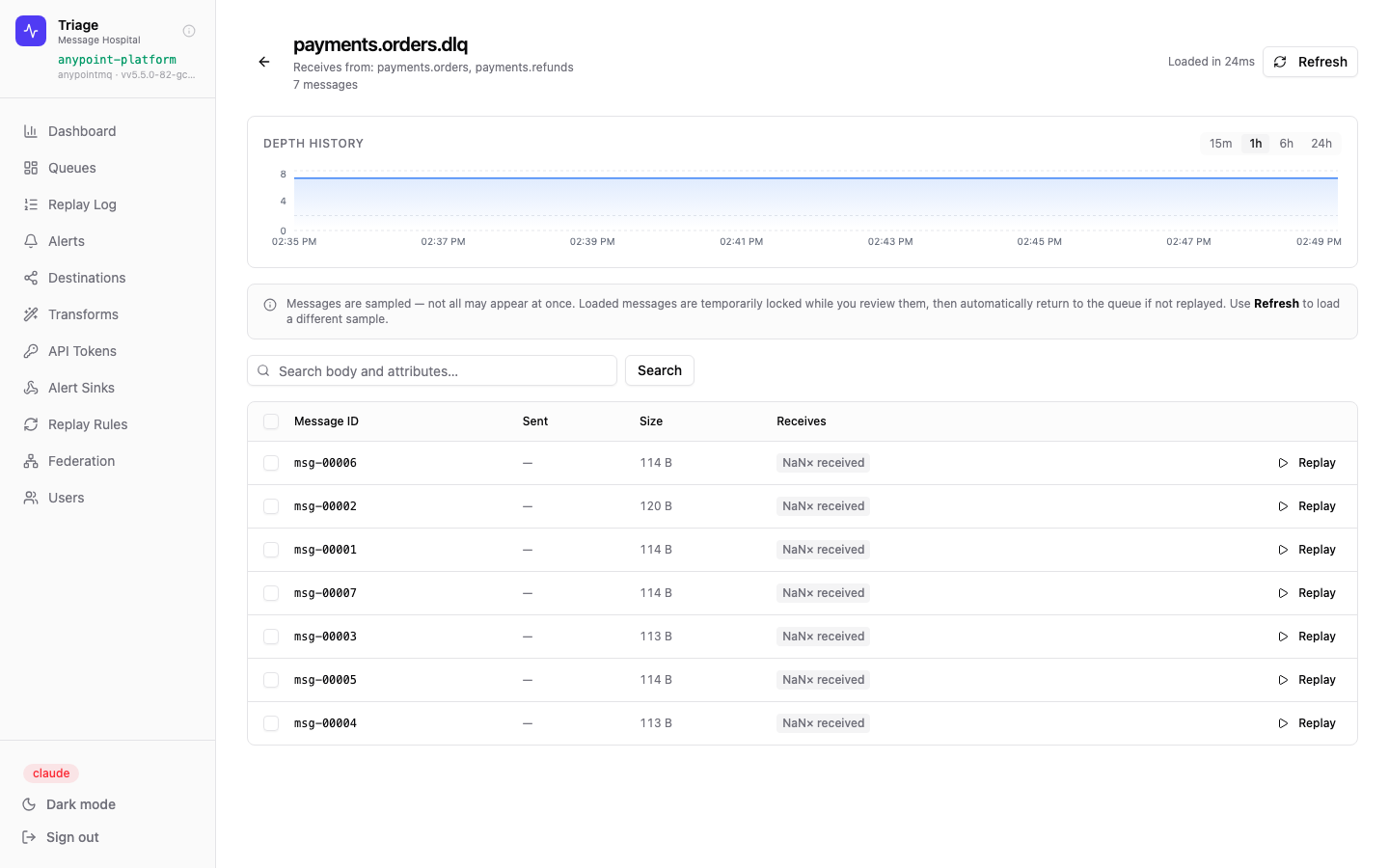
Queue detail showing a live depth-history chart and the sampled message list for payments.orders.dlq. Triage knows this queue receives from payments.orders and payments.refunds — sourced directly from Anypoint bindings.
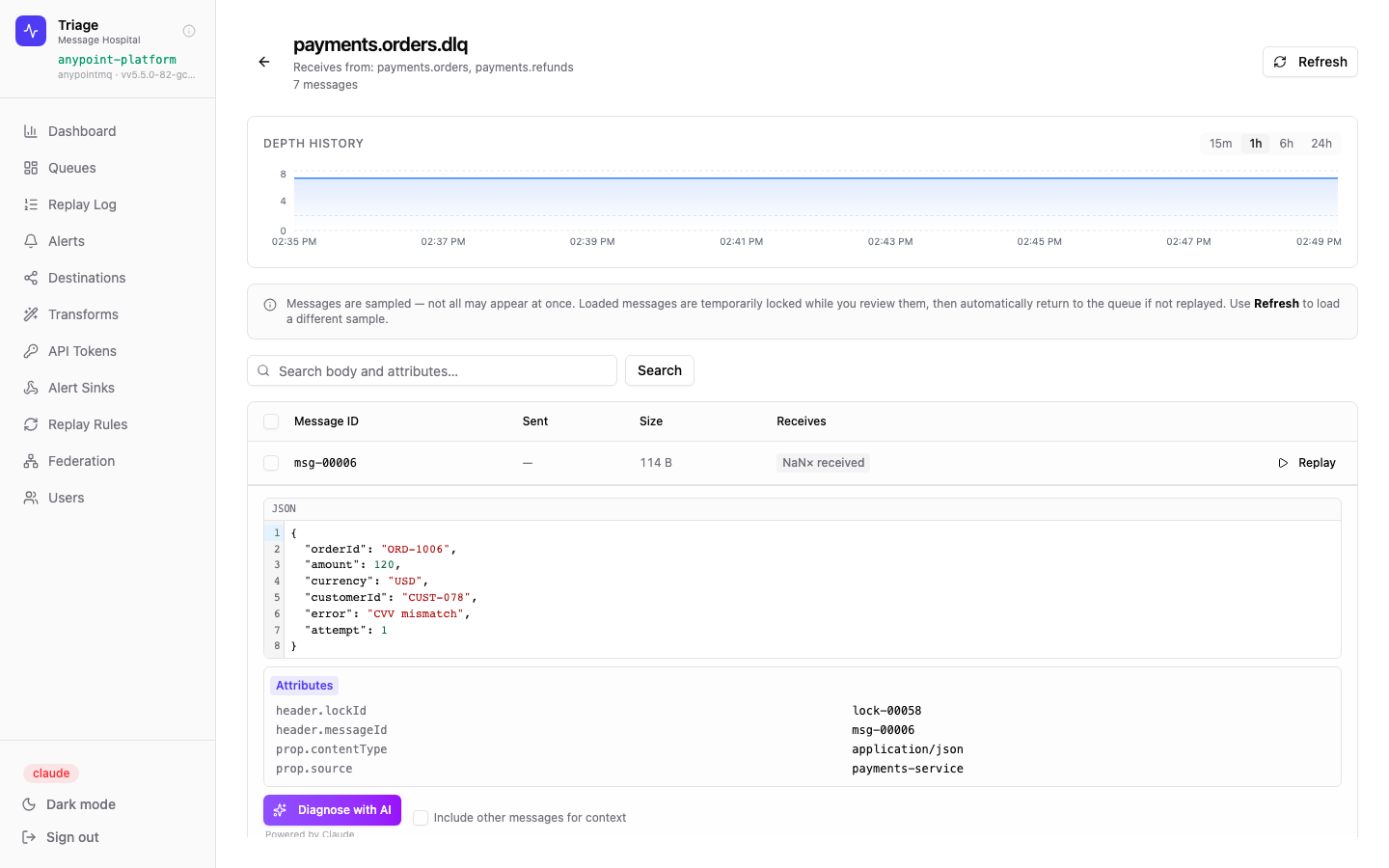
Expanded message view with syntax-highlighted JSON body and all Anypoint MQ attributes. The Diagnose with AI button sends the payload to your configured LLM provider for root-cause analysis.
System health at a glance
The dashboard aggregates metrics across all providers and instances in real time. It's the first screen on arrival and provides the situational awareness needed to prioritise where to act.
What you see
-
📊DLQ count & depth — how many dead letter queues exist and the total live message depth across all non-empty ones.
-
↩Replay history chart — replays per day over the last 7–90 days, with selectable window. Links directly to the full replay log.
-
⚡Active alerts — count of firing alert rules, so issues in quiet queues don't get missed.
-
🌐Federation peer health — all connected Triage instances listed with live latency. Green dots mean mTLS handshakes are healthy.
-
🔄Auto-refresh — toggle to keep the dashboard live. Numbers update without a page reload.
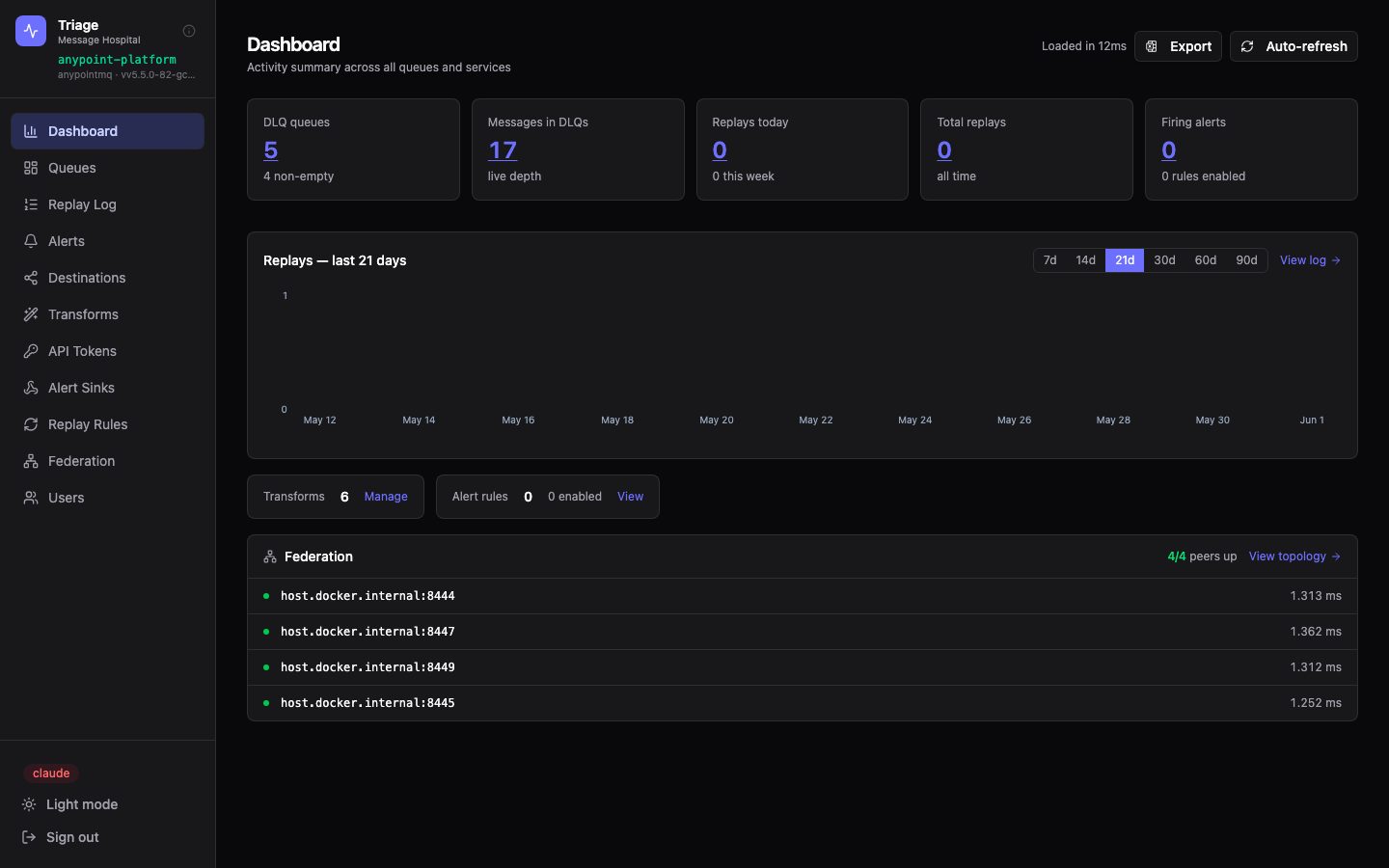
Dashboard in dark mode. Triage supports full light/dark theming with a one-click toggle.
Find and inspect any queue instantly
The queue browser surfaces every DLQ across all connected providers in a unified list. Wildcard search and a non-empty filter cut through environments with hundreds of queues to find what matters.
Queue list with provider tags, message counts, and a depth summary bar. Non-empty only toggle hides quiet queues for focus.
Queue list features
-
🔎Wildcard name search —
*dlq*orpayment*style patterns supported -
●Non-empty filter to immediately focus on queues with pending messages
-
🏷Provider tag on every row — know at a glance which broker a queue belongs to
-
📈Message count badges show depth, colour-coded by severity
Drilling into payments.orders.dlq shows a real-time depth chart, upstream queue bindings, and a sampled batch of messages ready to inspect or replay.
Inside a queue
-
📉Depth history chart — configurable 15m / 1h / 6h / 24h windows show whether depth is growing or draining
-
🔗Upstream bindings — for Anypoint MQ, shows which exchanges and queues feed this DLQ
-
🔒Non-destructive sampling — messages are locked on peek, auto-released if not replayed
-
🔍Body + attribute search — find specific messages by payload content or header values
-
▶Per-message replay — one-click inline replay button on every row
Read, diagnose, and replay failed messages
Clicking a message opens a rich inspection panel — syntax-highlighted JSON or raw text, full attribute listing, and an optional AI diagnosis. From there a single click replays it to any configured destination.
Message inspection showing the JSON body from a failed payment order. The error field — "Insufficient funds" — is visible immediately. Message attributes (lockId, contentType, source service) are listed below the body.
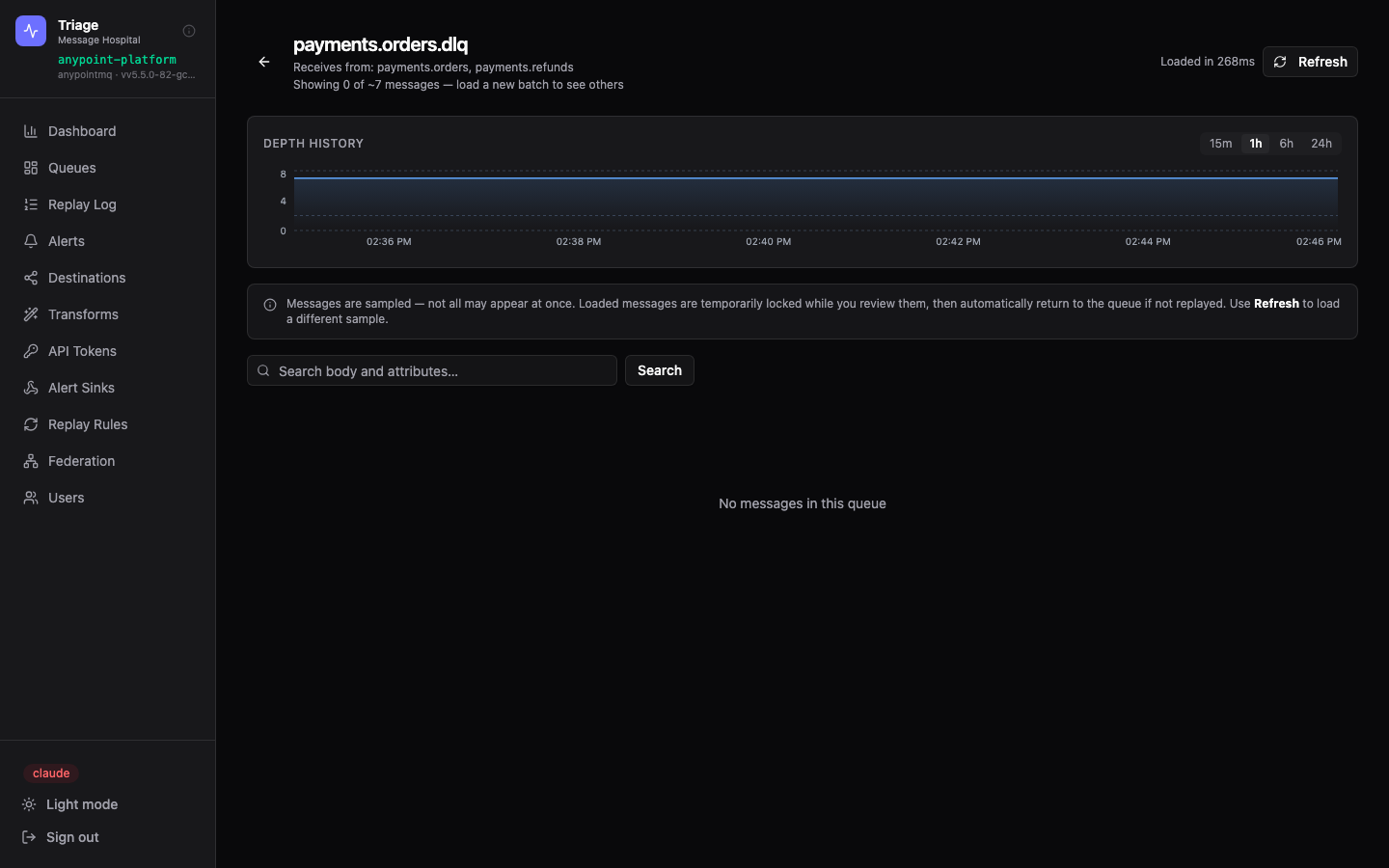
Dark mode queue detail — all depth charts and message tables work identically in both themes.
AI Diagnosis — Provider-Agnostic
The Diagnose with AI button submits the message payload, attributes, and optionally a batch of related messages to your configured LLM provider. The response explains the most likely root cause and what change would allow the message to be processed successfully.
-
🤖Analyses JSON structure, error fields, and attribute metadata in context
-
📎Include other messages for context — optionally sends sibling messages so the model can spot patterns across multiple failures
-
💡Returns a human-readable explanation and remediation steps — no queue expertise required
Replay controls
-
▶Immediate replay — sends the message (with optional transform applied) back to the source queue or a custom destination
-
☑Bulk replay — select multiple messages and replay them all in one action
-
🔄Transform before replay — attach a saved transform to reshape the payload before it re-enters the processing queue
-
📋Audit trail — every replay is logged to the Replay Log with actor, timestamp, and outcome
Visualise the full routing topology
The Destination Graph maps every exchange, queue, and DLQ in your Anypoint MQ environment — showing bindings, message counts, and warnings for configuration gaps like unbound exchanges.
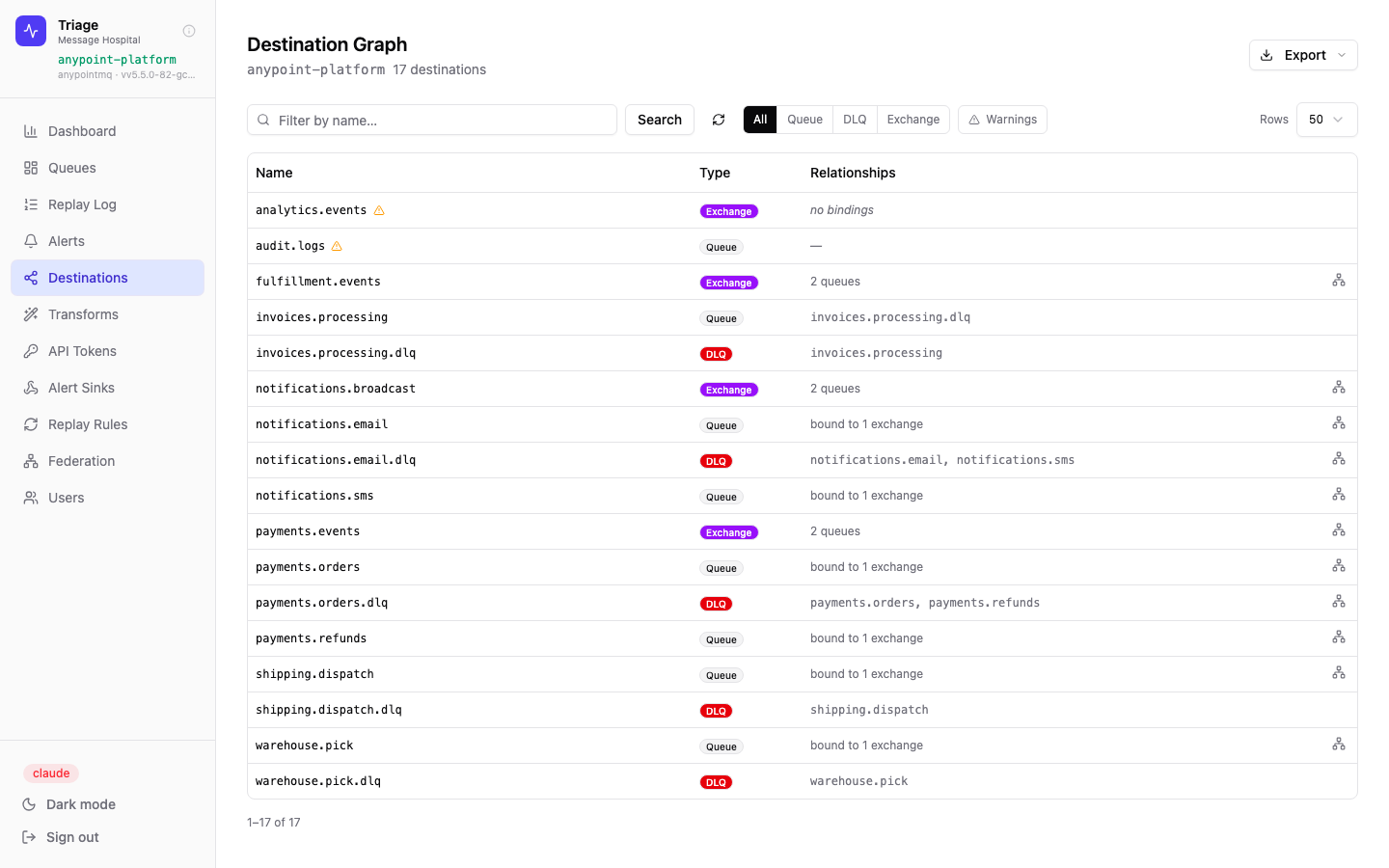
The destination list for the anypoint-platform provider showing 17 destinations. Each row is typed — Exchange, Queue, or DLQ — with its downstream bindings. Warning icons flag exchanges with no bound queues.
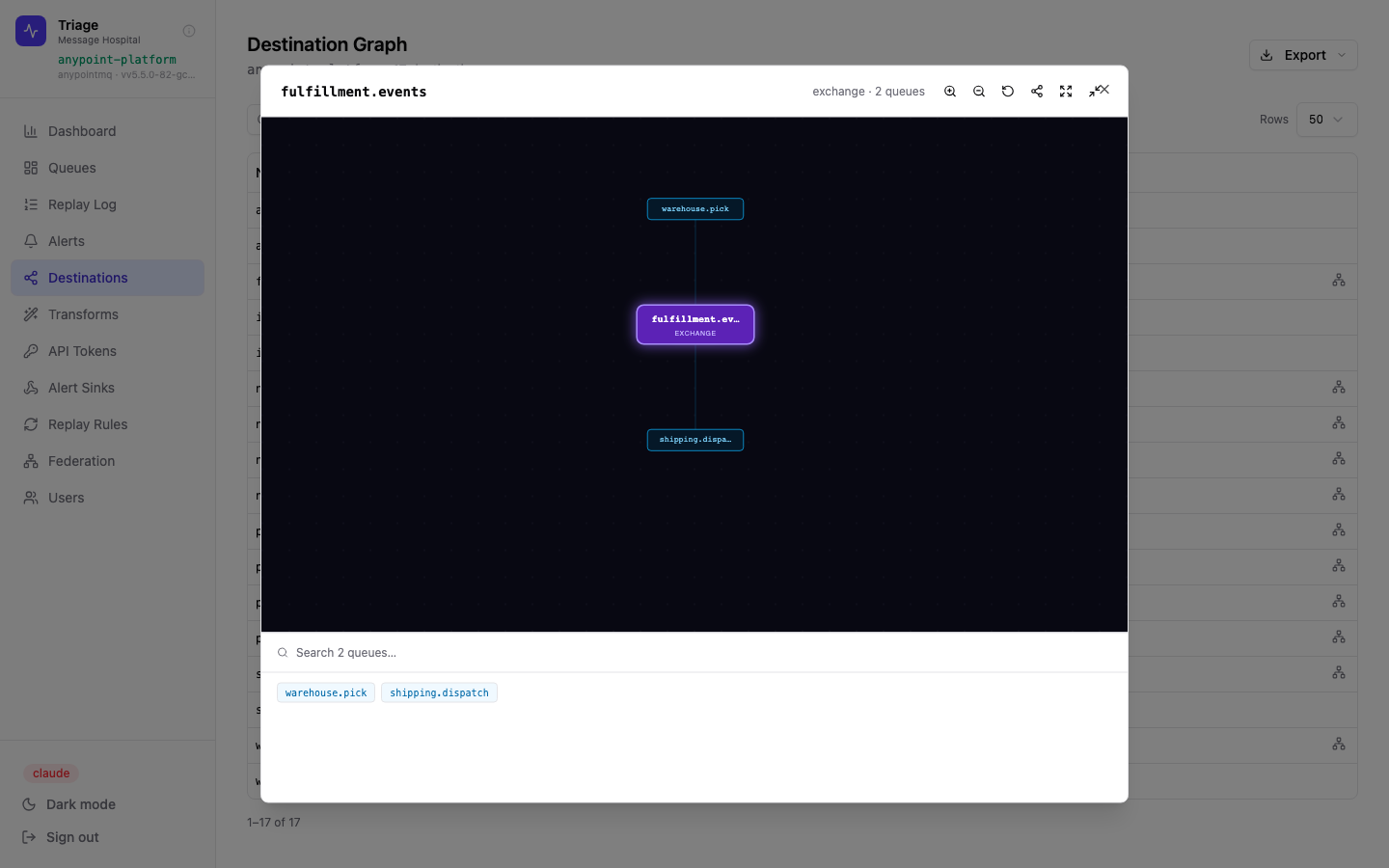
Clicking the bindings icon opens the visual graph for that exchange. Here fulfillment.events fans out to warehouse.pick and shipping.dispatch. Zoom, pan, and share controls are built-in.
Topic fanout
Exchanges are the entry points — messages published here are fanned out to all bound queues. Triage shows which queues each exchange feeds.
Processing queues
Regular queues receive messages from one or more exchanges. Triage links each queue back to its exchange and forward to its DLQ.
Dead letter queues
DLQs are the focus of Triage. Each one is linked to the queues that feed it so the failure chain is always visible.
Share topology graphs — no login required
Any binding graph can be shared with anyone in the organisation — or outside it — via a time-limited URL. The recipient sees a full-screen, interactive graph with no account, no Triage access, and no exposure to message data or operational controls.
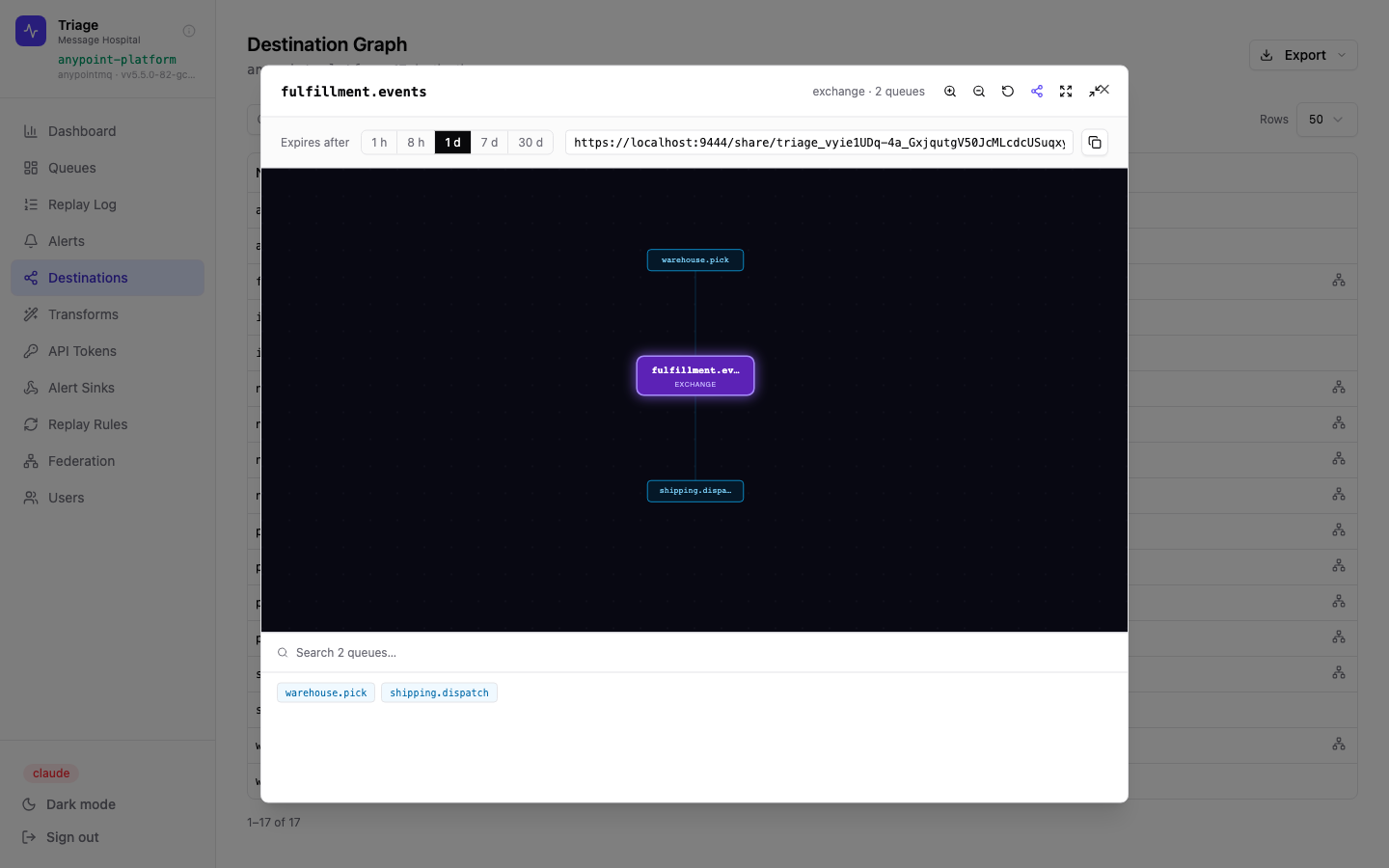
Clicking the share icon in the graph toolbar generates a link instantly. Choose an expiry — 1 hour to 30 days — and copy the URL to paste into a Slack message, Jira ticket, or email.
How it works
-
🔗Token-scoped URL — each link contains a unique share token tied to a specific graph and expiry. Tokens are server-side; revoking access means the link stops working immediately.
-
⏱Configurable TTL — 1 h, 8 h, 1 d, 7 d, or 30 d. Short-lived for incident comms; longer-lived for architecture review docs.
-
🔒Read-only, data-free — the shared view shows topology only: node names, types, and connections. No message payloads, no queue depths, no replay controls.
-
🏷Provider context — the shared view labels the provider (anypoint-platform) and the exchange name in the header so recipients understand what system they're looking at.
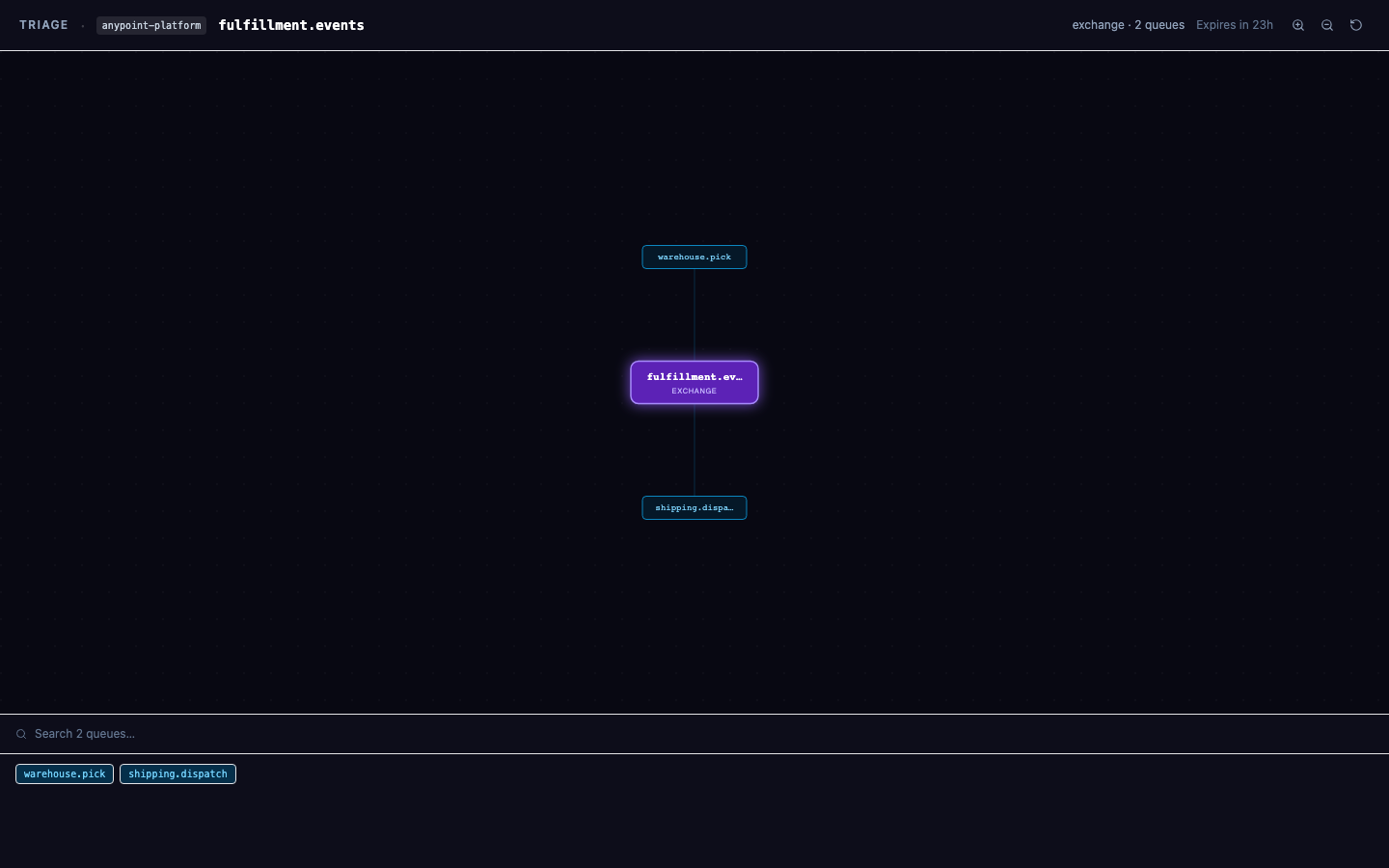
The recipient's view — no navigation, no sidebar, no Triage account required. The header shows the provider name, exchange, queue count, and the expiry countdown. Zoom and pan work normally. This is the complete view.
Incident response
Drop a share link into an incident Slack channel so everyone — including on-call engineers unfamiliar with the topology — can see exactly which exchange and queues are involved.
Vendor & partner handoffs
Share a binding graph with an external vendor during integration work without giving them a Triage account or exposing any operational data.
Architecture documentation
Link to a 30-day share from a Confluence page or architecture decision record. It renders a live graph rather than a stale diagram screenshot.
Shape payloads before replay
Transforms are named JavaScript functions stored in Triage. When a message is replayed, the selected transform runs first — letting you fix broken payloads, add missing fields, convert formats, or dynamically re-route messages.
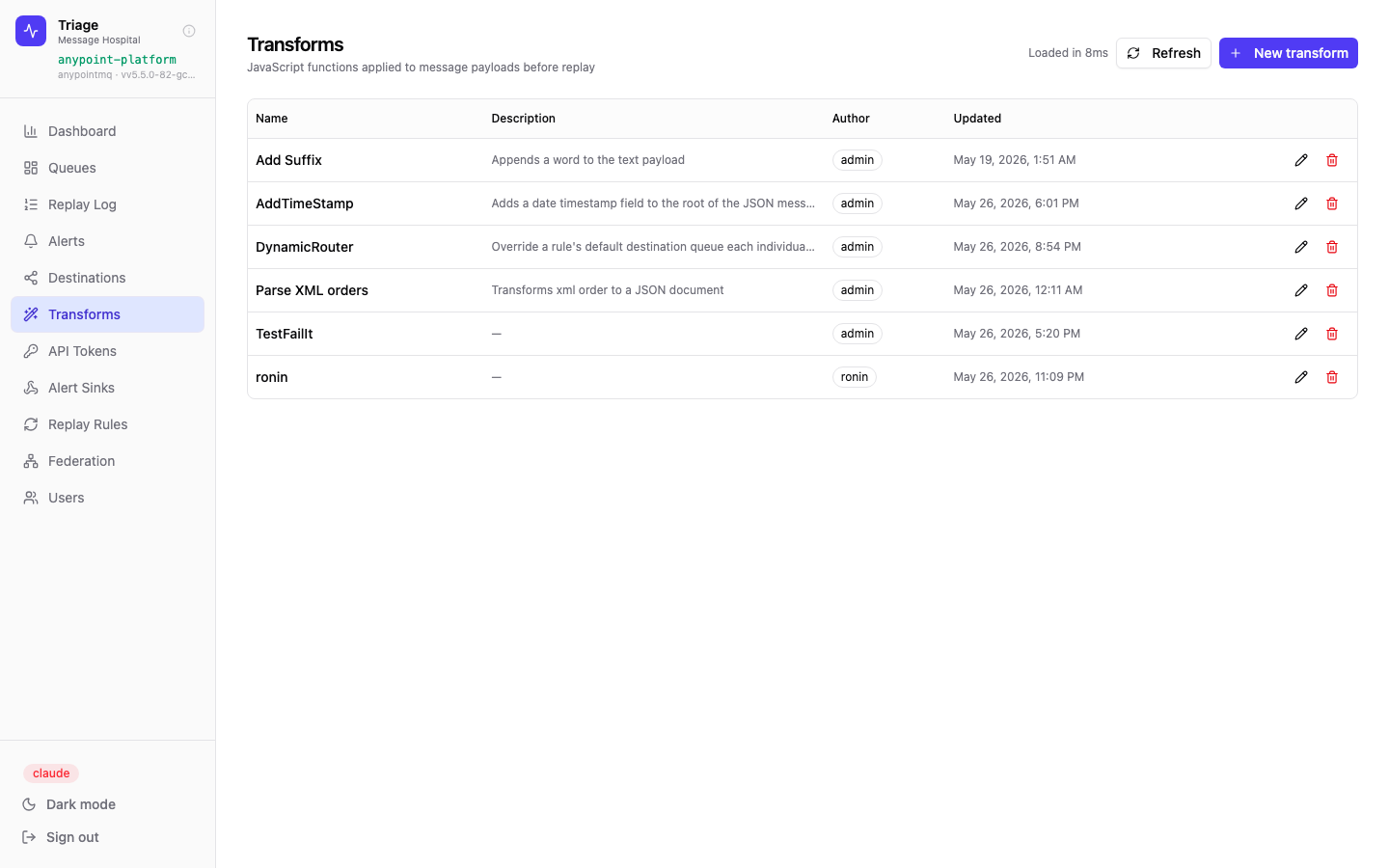
The transform library. Each entry has a name, description, author, and last-updated timestamp. Shared across all users in the instance.
-
📝JavaScript sandbox — transforms receive
payload(parsed object) andattrs(message properties). Return the modified payload or a new object. -
▶Live test panel — paste a sample payload and run the transform right in the editor. See the output instantly before saving.
-
🗂Named library — save and reuse transforms across queues and replay rules. Descriptive names keep the library navigable.
-
🔀Dynamic routing — use the
destinationfield in replay rules combined with a transform to re-route a message to a different queue at replay time. -
🖋Format button — auto-formats the code with a single click.
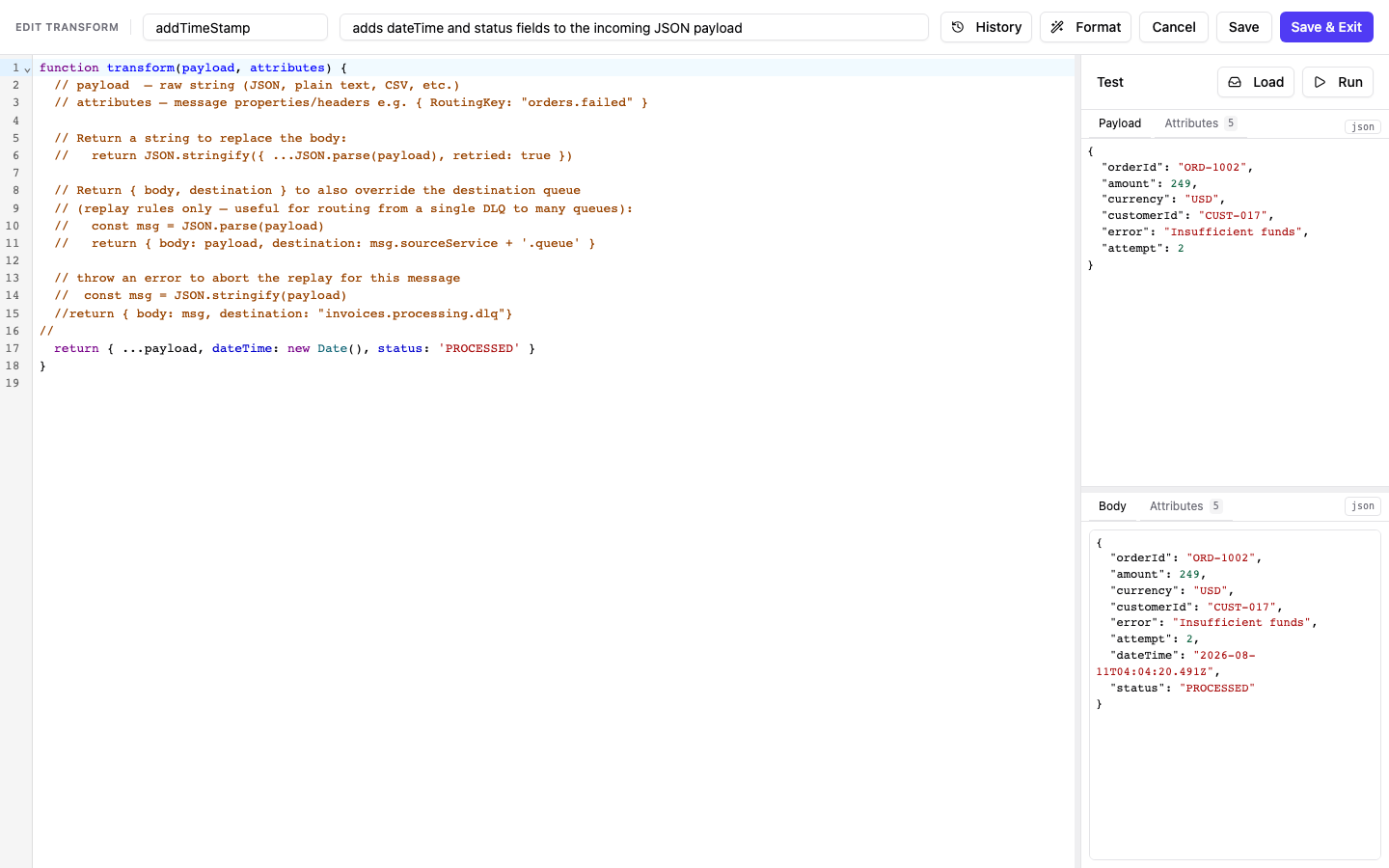
The transform editor with the addTimeStamp function open and just run. The right panel holds the test payload and its attributes; the pane below shows the resulting body — here the original order plus the dateTime and status fields the transform added. Load pulls a real message from a queue to test against, and History shows previous versions of the script.
Know before customers do
Alert rules watch queue depth over time and fire when a threshold is exceeded for a sustained period. Notifications are delivered to any configured alert sink — webhook, SNS, OpenTelemetry, Microsoft Teams, or Opsgenie.
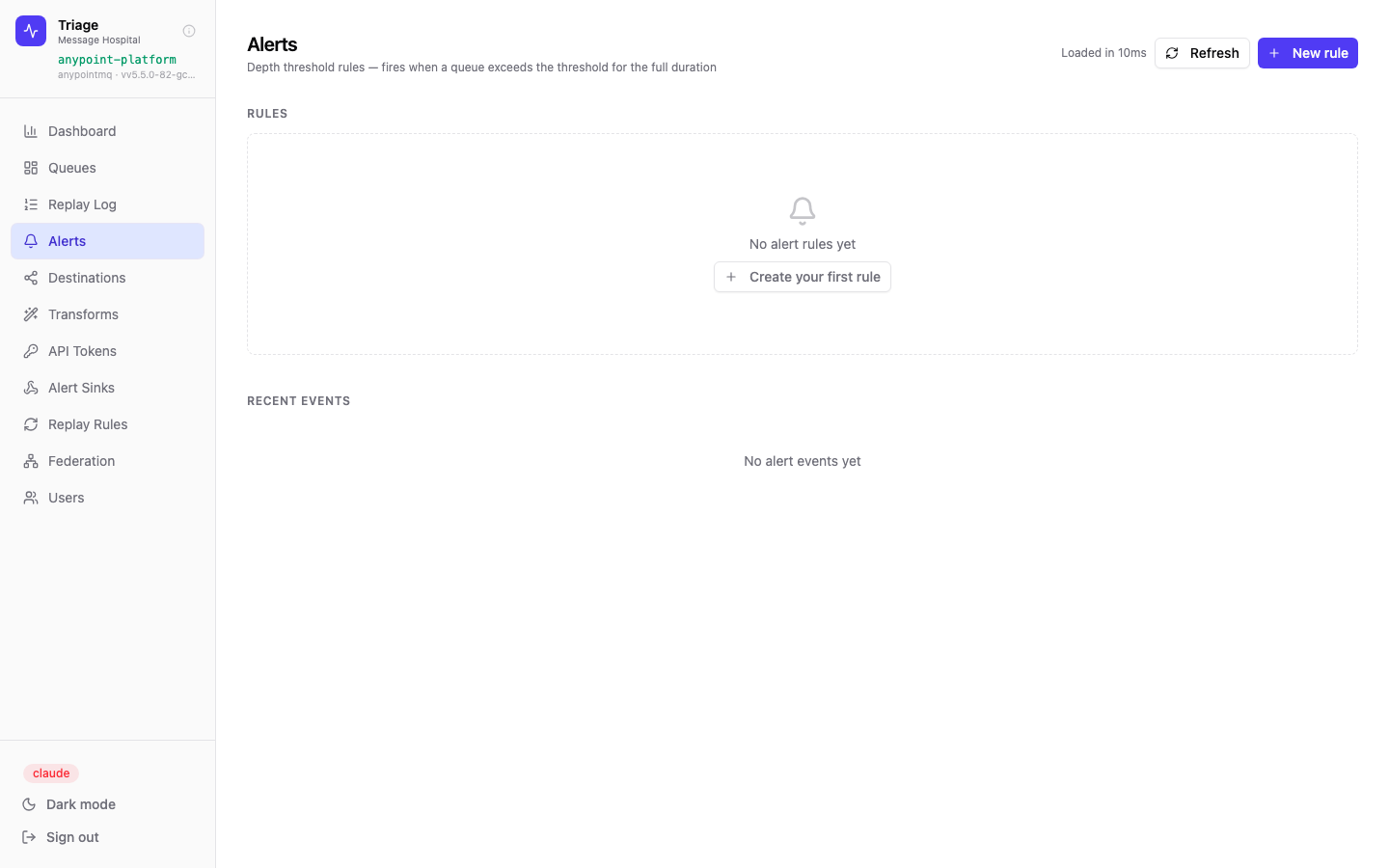
Alert rules page. Rules fire when depth exceeds a threshold for the full duration — avoiding noise from transient spikes.
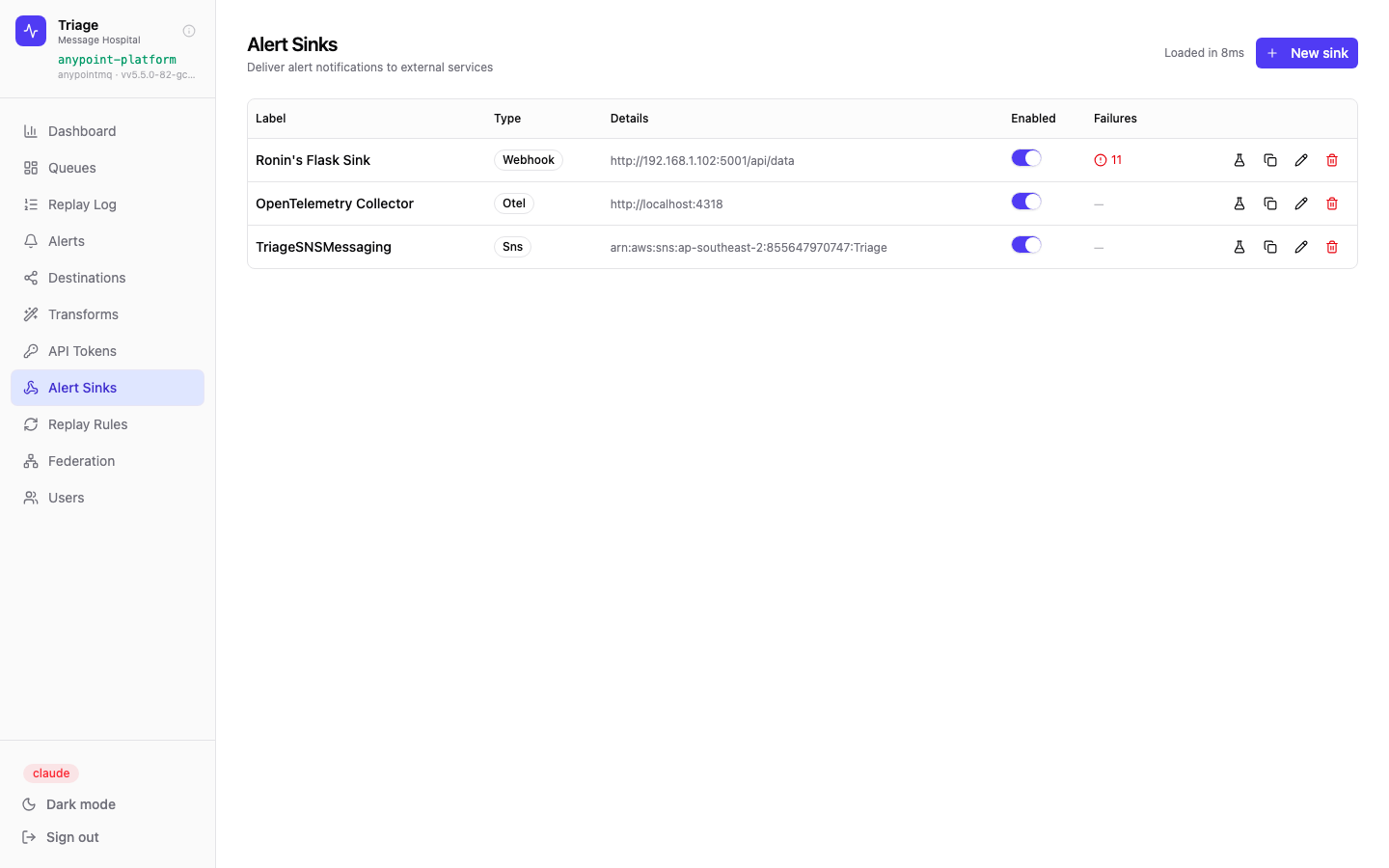
Alert sinks page — each sink can be enabled/disabled independently; failure counts are tracked per sink. Five sink types are available: Webhook, SNS, OpenTelemetry, Microsoft Teams, and Opsgenie.
Webhook
POST a JSON payload to any HTTP endpoint. Works with PagerDuty, Slack, BigPanda, Datadog, Rundeck, ServiceNow, Google Chat, or any custom alerting pipeline.
Amazon SNS
Publish to an SNS topic ARN. Fan-out to email, SMS, Lambda, or SQS from there using native AWS routing.
OpenTelemetry
Emit alert events to an OTEL collector endpoint. Integrates with Datadog, Grafana, Honeycomb, and any OTLP-compatible backend.
Microsoft Teams
Post alert cards directly to a Teams channel via an incoming webhook. Alerts fire and auto-resolve — the same rule drives both state transitions.
Opsgenie
Open and close Opsgenie alerts via the Alerts API using an API key. Aliases are tied to the rule so a single on-call rotation tracks the full firing-to-resolution cycle.
Replay rules — automate the routine
Replay rules define conditions under which Triage automatically moves messages between queues on a schedule. For well-understood failure patterns, this eliminates the need for manual operator intervention entirely.
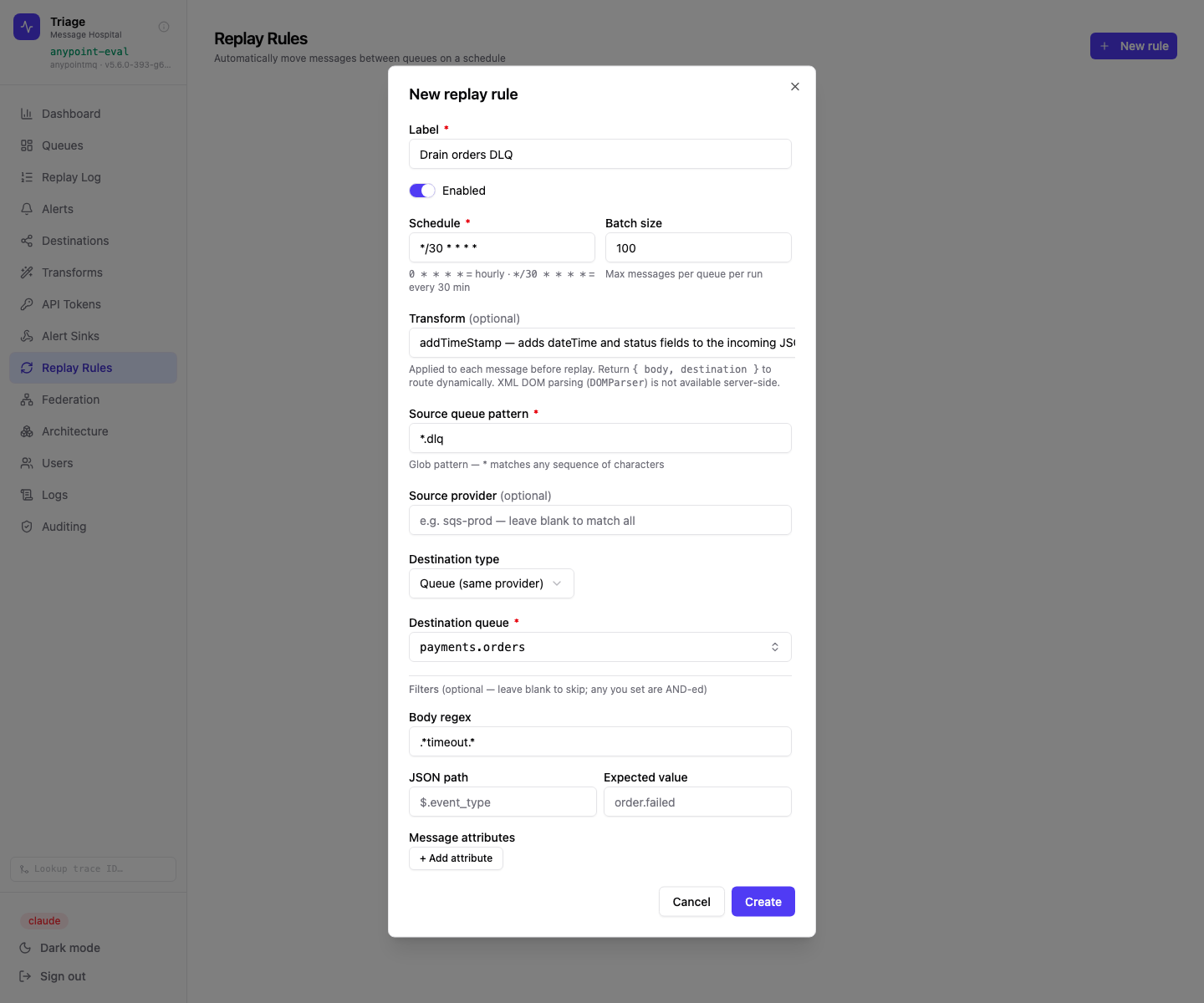
Defining a rule: a cron schedule, a batch size, an optional transform, a glob pattern for the source queues, and a destination. The filters below narrow it further — only messages whose body matches a regex, or whose JSON path holds an expected value, are replayed.
-
⏱Scheduled execution — run a rule on a cron schedule (e.g., every 5 minutes) to continuously drain a DLQ back to processing.
-
🔄Transform integration — pair a rule with any saved transform so every auto-replayed message is fixed before re-injection.
-
📍Custom destination — route replayed messages to a different queue than the original source if the downstream handler has changed. Dead-letter queues are deliberately excluded from the picker — they are a source to drain, not a replay target.
-
🔍Content filters — restrict a rule to messages matching a body regex, a JSON path value, or specific message attributes. Filters are AND-ed, so a rule only touches the failures you have actually diagnosed.
-
📋Full audit trail — all automated replays appear in the Replay Log, attributed to the rule name, not a user.
The Replay Log — a tamper-evident audit trail of every replay action. Searchable by queue, actor, message ID, transform, and date range. Exportable to CSV.
Replay Log
Every manual and automated replay creates an immutable record in the Replay Log. Compliance teams can export the full history to CSV. Engineers can filter by message ID to trace a specific message through all replay attempts.
Poison objects in S3, GCS, or Azure Blob get the same treatment as DLQ messages
Triage can connect to a Google Cloud Storage container, an Azure Blob container, or any S3-compatible store — AWS S3, Cloudflare R2, Wasabi, Backblaze B2, DigitalOcean Spaces, or self-hosted MinIO — as a storage provider for files a pipeline couldn't process and moved aside. The Storage page gives operators the same browse, edit, diagnose, and replay workflow as the queue browser, with its own audit trail — and no one needs direct bucket credentials to use it.
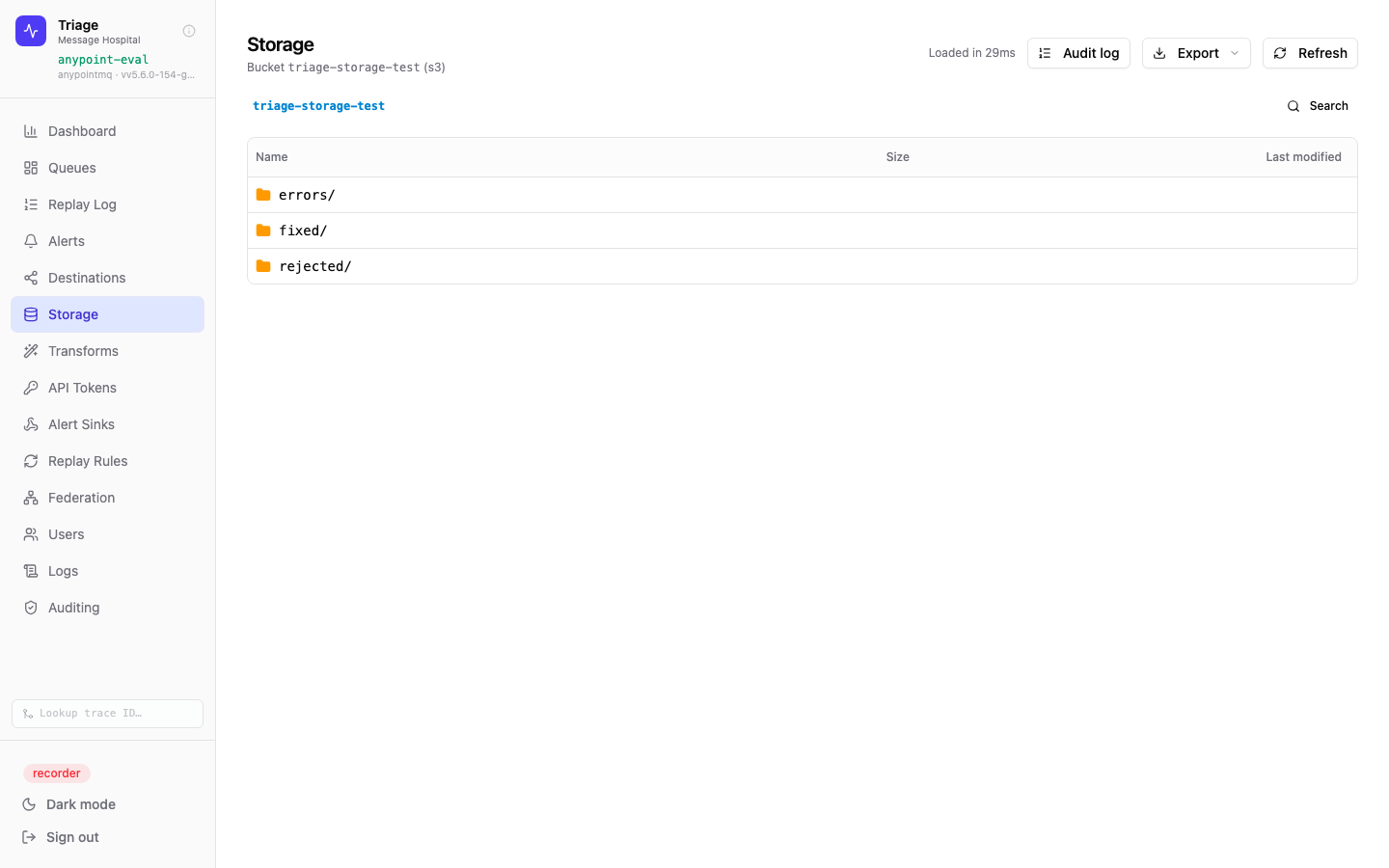
The Storage page lists objects in the configured bucket and prefix. Prefix, substring/wildcard search, and file-extension filters narrow the view — useful for buckets with thousands of rejected files.
-
🪣S3-compatible, GCS & Azure Blob storage providers — one S3 provider spans AWS S3, Cloudflare R2, Wasabi, Backblaze B2, DigitalOcean Spaces, and MinIO, alongside native Google Cloud Storage and Azure Blob, mirroring the queue provider abstraction so the same operational model applies to object storage as to brokers. Bucket credentials are server-side only.
-
🔎Prefix, search & extension filters — jump straight to a "rejected/" prefix, search by substring or wildcard, or filter to a specific file type.
-
📝Edit, diff & preview — open an object, fix its body in place, preview the rendered output, and diff against the original before saving.
-
🔄Replay to queue — send a fixed object to any queue, with an optional transform applied, then remove it from the bucket — or move it between storage locations.
-
🤖AI diagnosis — the same opt-in LLM-powered diagnosis available for queue messages also works on storage objects, including file metadata.
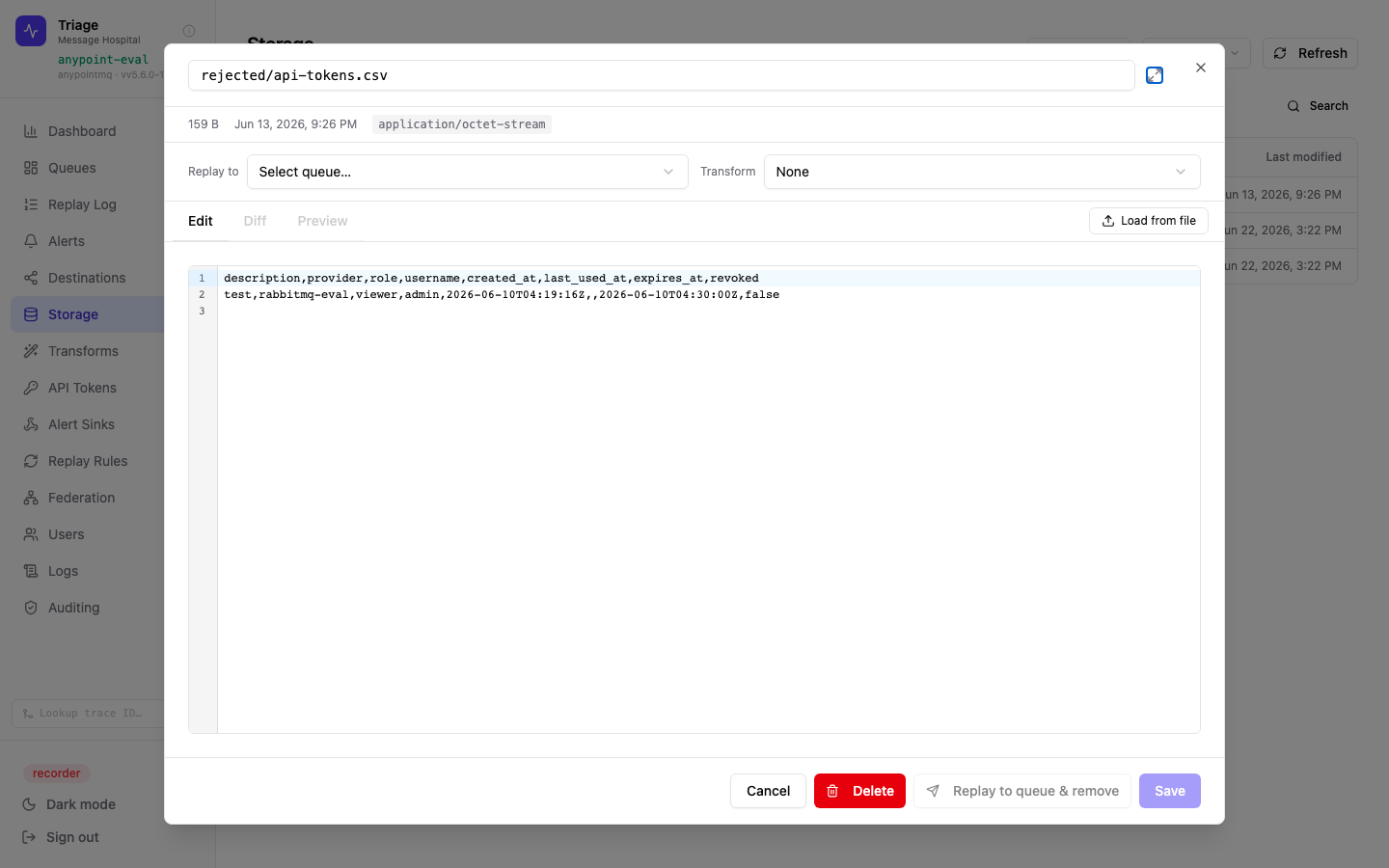
Opening an object shows its size, last-modified time, and content type, with Edit / Diff / Preview tabs. "Replay to" sends the (optionally transformed) body to a queue and removes the object from storage.
Built on the same primitives
Storage-based alert rules can fire on prefix, search, or extension matches — just like depth alerts for queues. Replay rules can use storage as a source or destination, including storage-to-storage moves, so a "rejected" prefix can be drained automatically on a schedule.
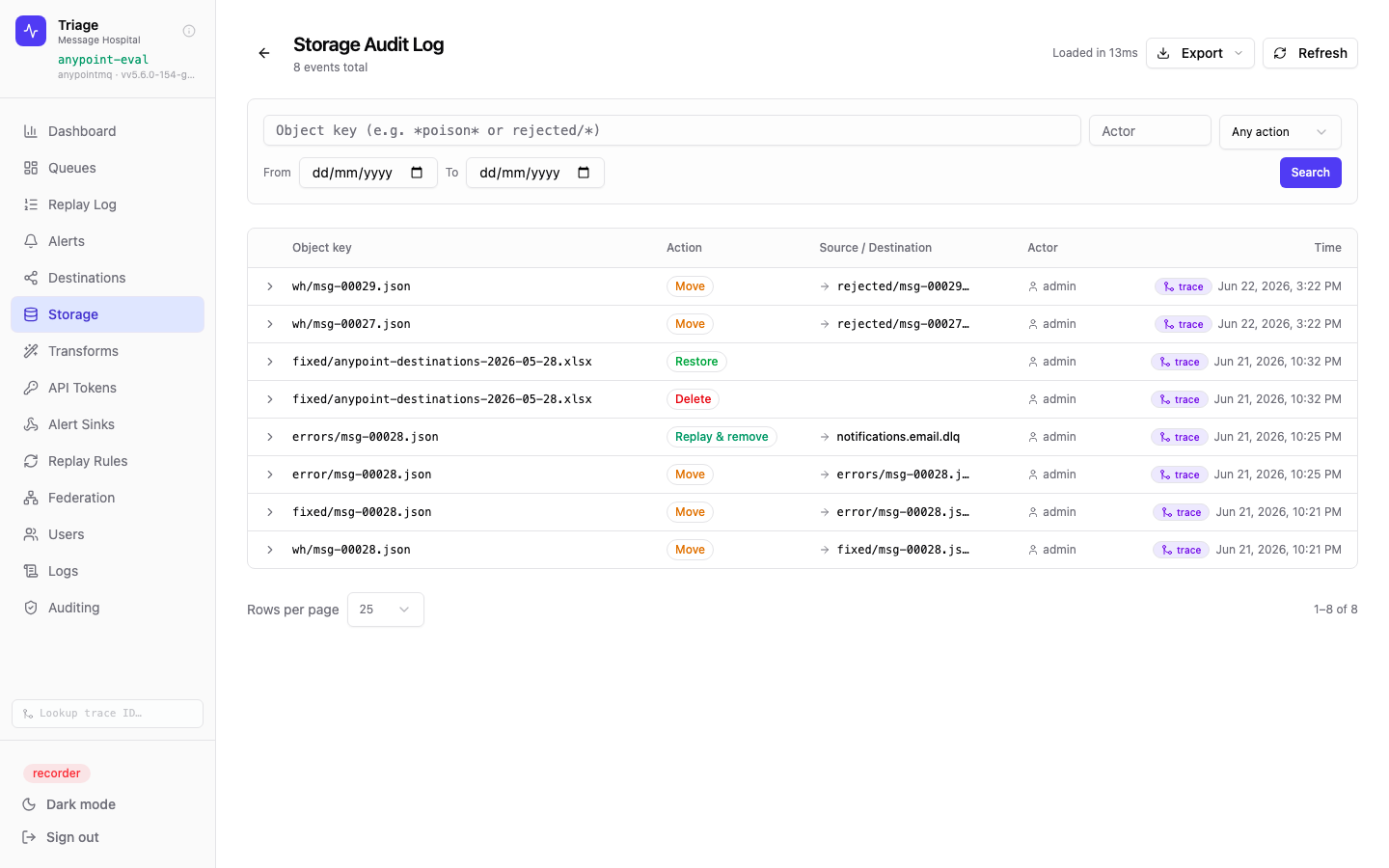
The Storage Audit Log — every edit, delete, restore, republish, and move is recorded with the object key, action, destination, actor, and timestamp. Filterable by object key, actor, action, and date range, and exportable to CSV/Excel.
DLQ operations as first-class observability
Most OTEL-instrumented systems have a blind spot: failed messages that land in dead letter queues vanish from the trace graph. Your services emit spans, but the moment a message is dead-lettered the story ends. Triage closes that gap — making every DLQ replay a correlated, traceable event inside your existing observability platform, with no new tooling required.
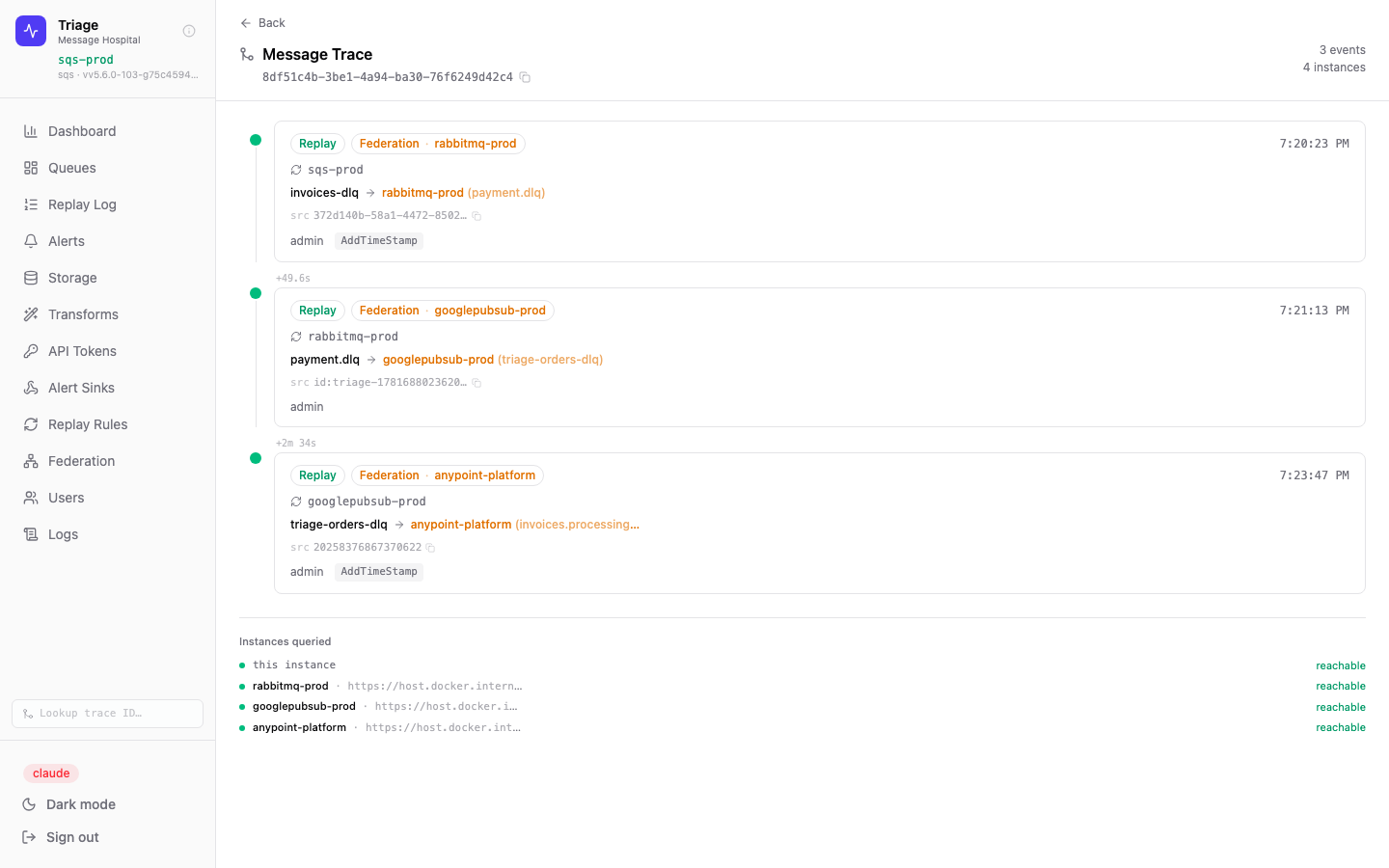
The Triage trace timeline for a single message — 3 hops across SQS → RabbitMQ → Google Pub/Sub → Anypoint MQ, assembled in real time from 4 federated instances. Each hop shows source, destination, actor, transform applied, and elapsed time.
-
🔗Native trace timeline — every replay event is stamped with a
root_triage_message_idthat persists across all subsequent hops. One click from the Replay Log opens the complete message journey, with no OTEL infrastructure required. -
📡OTEL span export — set
OTEL_EXPORTER_OTLP_ENDPOINTand every replay span is exported via BatchSpanProcessor to Datadog, Grafana Cloud, Honeycomb, Jaeger, or any OTLP-compatible backend — alongside your existing service traces. -
🔄W3C traceparent propagation — Triage injects
traceparentinto outgoing replay message attributes and extracts it from inbound DLQ messages. Downstream services see the replay as a continuation span inside the original distributed trace, not a new orphan event. -
🔔Alert events in your APM — the OpenTelemetry alert sink emits DLQ depth events to your collector. Queue depth spikes appear in the same dashboards as your service error rates and latency — no separate alerting tool required.
-
🌐Federation-aware trace assembly — trace lookups fan out across all peer Triage instances via BFS, deduplicating by event ID. A message that crossed three environments shows up as a single, complete timeline.
-
✕DLQ failures are a trace dead-end — the distributed trace terminates the moment a message is dead-lettered, with no record of what happened next
-
✕Replay operations are invisible to your APM — engineers have no way to correlate a manual replay with the downstream service behaviour it triggered
-
✕Alert tooling is siloed — DLQ depth spikes live in a separate system from service error rates, making incident correlation manual and slow
-
✓Every replay is an OTEL span in your existing APM — Datadog, Grafana, Honeycomb — correlated with the original request trace via W3C traceparent
-
✓Native trace timeline reconstructs the full message journey across providers and environments with no OTEL infrastructure required at all
-
✓DLQ depth alerts emit to your OTEL collector — queue health appears beside service error rates in the same on-call dashboards your team already watches
Built for teams already on an OTEL adoption roadmap
Many larger organisations are standardising on OpenTelemetry Collectors as the single egress point for all telemetry — traces, metrics, and logs — with fan-out to whichever backends they choose. Triage slots directly into that infrastructure with a single environment variable: OTEL_EXPORTER_OTLP_ENDPOINT. The replay events, storage actions, and depth alerts that were previously invisible become traceable and correlated with your services — in the same platform your teams are already using — with no architectural changes and no new dashboards to maintain.
Point an AI agent at your dead letter queues
Triage ships a built-in Model Context Protocol server. An SRE can connect any MCP client to a running instance and ask, in plain language, why a queue is filling up. Because Triage is broker-agnostic, the agent gets one consistent tool surface across SQS, RabbitMQ, ActiveMQ, Azure Service Bus, Google Pub/Sub, and Anypoint MQ — a question no single-broker cloud console can answer. With federation configured, that surface reaches the whole mesh from the one endpoint the agent is pointed at: any token can describe the estate with get_instance_info, and an operator token adds live peer-workload comparison — to find where a backlog really sits and confirm a cross-instance replay target before it is proposed. It reaches the object side too: messages archived to a bucket instead of left on a queue are listable, and every archived object carries the trace lineage that connects it back to the failure that produced it.
🔌 Nothing to deploy
The server is mounted inside the binary at /api/v1/mcp and enabled by default — no environment variable, no sidecar, no second process. Transport is stateless streamable HTTP, so replicas stay interchangeable behind a load balancer with no sticky routing.
🔑 The caller's own access
The endpoint sits behind the same auth middleware as the REST API, and every tool runs with the claims of the bearer token that invoked it. A viewer token yields a strictly read-only agent; share links are rejected outright; tool calls are audited exactly as the equivalent REST calls are.
🔒 Read-only by construction
Replay, purge, and delete are absent, not gated — remediation stays human-authored, so an agent that can only observe cannot turn a bad inference into a production change. There is no tool to peek at messages still sitting in a queue either — peeking is a real receive on most brokers, and an agent looping it would redrive healthy messages into the DLQ.
> why is payments.orders.dlq filling up?

⏺ triage - get_provider_info
  {"region":"us-east-1","destinationCount":17,"dlqCount":5,"mappedDLQCount":5}

⏺ triage - list_queues (type: "dlq")
  payments.orders.dlq       depth 7   ← payments.orders, payments.refunds
  invoices.processing.dlq   depth 3   ← invoices.processing
  shipping.dispatch.dlq     depth 3   ← shipping.dispatch
  notifications.email.dlq   depth 0   ← notifications.email, notifications.sms

⏺ triage - get_queue_config (queueName: "payments.orders.dlq")
  {"maxDeliveries":10,"defaultTtlMillis":604800000,"defaultLockTtlMillis":120000}

⏺ triage - get_depth_history (queueName: "payments.orders.dlq", minutes: 60)
  7 → 7 → 7 → 7 → 7 → 7 … flat for the full window

⏺ triage - list_replays (limit: 3)
  13:06:31  warehouse.pick.dlq → payments.orders   actor: admin   unmodified

Seven messages, and the depth hasn't moved in an hour — this isn't an active
incident, it's a backlog nobody has drained. Two source queues feed this DLQ and
the broker retries ten times before dead-lettering, so these have each failed 10
deliveries. The one recent replay came from a different DLQ, so nothing here has
been retried yet.
A real session against a Triage instance over MCP — a viewer token, ten read-only tools, and no way to change a thing.
> is this payments backlog only on Anypoint, or the whole group? can I replay onto RabbitMQ?

⏺ triage - list_federation_peers
  anypoint-eval   self   up   depth 17   dlq 5   alerts 0   sharedTokenStore true
  rabbitmq-eval          up   depth 17   dlq 5   alerts 0   sharedTokenStore true
                                                 unknownPeers: https://triage:8444

⏺ triage - get_peer_queues (peerUrl: "https://triage-rabbitmq:8444")
  payments.orders          (source)
  payments.orders.dlq      (dlq)
  warehouse.pick           (source)
  invoices.processing.dlq  (dlq)   … 13 queues

The backlog isn't isolated to this instance — the RabbitMQ peer is carrying the
same 17 across 5 DLQs, so this is a group-wide pattern, not one bad node. RabbitMQ
does expose a live payments.orders queue, so a cross-instance replay there is
possible — and my token is accepted on that peer (sharedTokenStore true). One peer
also federates with a triage:8444 I can't see, so my view of the group may be
partial. I can't perform the replay from here: these tools are read-only.
The two live cross-peer tools need an operator or admin token — and stay as read-only as the rest. The whole mesh, reasoned about from the one endpoint the agent is pointed at.
> invoices.processing.dlq is empty but finance says july invoices never landed. where did they go?

⏺ triage - list_storage_buckets
  {"name":"archive","type":"s3-compatible","label":"Wasabi eu-central-1",
   "endpoint":"s3.eu-central-1.wasabisys.com","reachable":true}

⏺ triage - list_storage_objects (prefix: "rejected/2026-07/", extension: "json")
  rejected/2026-07/inv-88213.json   4.1 KB   2026-07-29T02:14:07Z
  rejected/2026-07/inv-88219.json   3.8 KB   2026-07-29T02:14:09Z
  … 50 objects   nextCursor: "eyJrIjoicmVq…"

⏺ triage - get_storage_object_metadata (key: "rejected/2026-07/inv-88213.json")
  {"size":4218,"contentType":"application/json","storageClass":"STANDARD",
   "triageAttributes":{"x-triage-root-id":"9f3c…a7","x-triage-hop-count":"2"}}

⏺ triage - get_trace (rootId: "9f3c…a7")
  02:13:58  invoices.processing → invoices.processing.dlq   (maxDeliveries 10)
  02:14:07  archived → wasabi/archive   actor: rule "dlq-drain-to-archive"

⏺ triage - list_storage_events (key: "inv-88213", limit: 5)
  — no events —

They aren't lost, they were drained off the DLQ into the Wasabi archive bucket by
the dlq-drain-to-archive rule — which is why the queue reads empty. The trace shows
each one failed 10 deliveries out of invoices.processing before it was archived, and
nothing has been republished or edited since, so this batch is untouched and safe to
replay. There are more than one window's worth: nextCursor is still set, so 50 is
what I've seen, not the total.
The storage tools need an operator or admin token, exactly as the REST storage routes do. Keys, sizes and lineage — never an object body, never the sender's own attributes.
Sixteen tools — a whole incident walkthrough, across the mesh and the archive
| list_queues | Queues with current depth, DLQ status, and per-queue capabilities. The starting point for any investigation. |
| get_queue_config | Redrive policy, retention, visibility timeout, TTLs — why messages are arriving in this DLQ, not just that they are. |
| get_provider_info | Which broker this instance is attached to and which operations it supports — whether a proposed remediation is even possible here. |
| get_instance_info | Identify this instance — id, version, broker, enabled features — and list its federation peers with each peer's web URL, health, broker, version, and group. Served from cached health polling, no live call-out. |
| get_stats | Instance-wide shape: replay counts and success rate over a rolling window, live depth totals, transform and alert-rule counts. |
| get_depth_history | Time-series depth for one queue — separates a queue filling for days from one that spiked ten minutes ago. Answers "when did this start". |
| get_alert_status | Every alert rule's current state: alerting, ok, or never evaluated — what Triage itself already considers wrong. |
| list_alert_events | Alert transitions newest first — correlate a queue's behaviour with a deploy window, and spot a rule that has been flapping for a week. |
| list_replays | Past replay attempts with filters — whether these messages have already been retried, by whom or by which rule, and whether it worked. Metadata only: it says whether a body was modified before sending, but never returns the body itself, either version. |
| get_trace | One message's full journey by id: every hop, replay attempt, and transform, including hops into federated Triage instances. |
| list_federation_peers · operator/admin | Live workload on every instance in the federation group, self first — DLQ counts, total depth, and firing alerts per instance, so an agent finds which instance a backlog is actually on. peerCount and unknownPeers show whether the group is fully connected; sharedTokenStore says whether this credential is accepted on each peer or needs its own. |
| get_peer_queues · operator/admin | The queues on one federated peer that can receive a replay, and whether each is a DLQ — reached live over mTLS, confirming a cross-instance replay destination exists before an operator attempts it. |
| list_storage_buckets · operator/admin | The buckets this instance archives failed messages to — backend type, vendor label, endpoint, and whether each is actually reachable, so an unreachable bucket is never reported as an empty one. |
| list_storage_objects · operator/admin | Archived objects by prefix, key search, or extension — where to look when a queue is empty but messages are still unaccounted for. Cursor-paged: a non-empty nextCursor means there is more, however few this window matched. |
| get_storage_object_metadata · operator/admin | One object's size, content type, and storage class — plus the x-triage-* lineage archived with it, which hands a root id straight to get_trace. That pivot is what connects an object in a bucket back to the failure that produced it. |
| list_storage_events · operator/admin | Edits, republishes, moves, deletes, and restores against archived objects, newest first — the storage counterpart to list_replays, and the same question: has anyone already tried this? |
Tools that cannot drift from the API
Each tool dispatches into the same handler as the REST endpoint it mirrors, rather than reaching into the provider layer directly. RBAC, audit, error mapping, and provider-capability fallbacks are therefore identical by construction: "queue not found" reads the same through MCP as through REST, and a tool cannot quietly diverge from the endpoint behind it as the product evolves.
Why the descriptions matter
Each tool carries the domain semantics an OpenAPI schema cannot convey — that broker capabilities differ, that history only extends as far back as this instance has been polling, that a message which has already failed replay three times needs a different answer than one nobody has touched. That context is what turns a generic HTTP client into an agent that reasons about the incident.
One knob, for the one thing we can't prune
Everything the surface returns is either operator-defined naming or withheld outright — except object keys, which your own pipeline writes per message. On some estates they're opaque uuids; on others they carry customer identifiers. Redacting them isn't an option, since keys are how the storage tools are addressed. So MCP_STORAGE_TOOLS=false withholds that group entirely, leaving storage, the UI, the REST API, and the rest of the tools untouched. Whether keys may reach a third-party model is your call to make, not ours.
One binary. No moving parts.
Triage is a single statically-linked Go binary with the React UI compiled straight into it. The whole product is one process you run next to the Postgres and Redis you already operate — no application server, no reverse proxy, no Node runtime, no sidecars, and no agents on your hosts. For the team that has to keep it running at 2am, that's the point.
⚙️ Built in Go
Compiled CGO-free and statically linked — no libc, no interpreter, no runtime to install. One portable binary that starts cold in about a second and idles on tens of MB of memory. Go's concurrency is what lets a single process poll queues, evaluate alerts, and fan out bulk replays at once.
🖥️ React UI, embedded
The interface is a React app built once and compiled into the binary with go:embed. Triage serves its own frontend — there is no nginx, no CDN, and no separate static host to deploy, patch, or keep in version lockstep. Upgrades ship the UI and the server as one artifact.
🔒 Serves its own HTTPS
The binary is its own TLS-terminating web server, with automatic HTTP → HTTPS redirect on the secure port. No reverse proxy in front for TLS. Database migrations are embedded too and apply themselves on boot — no external schema tool in your deploy pipeline.
What you don't have to deploy
- ✓No application server or servlet container — the binary is the server.
- ✓No nginx, Apache, or reverse proxy — TLS and static assets are served by Triage itself.
- ✓No Node.js runtime in production — the UI is prebuilt and embedded, not built on the box.
- ✓No sidecars, agents, or daemonsets on your hosts.
- ✓No external migration tool — the schema ships in the binary and self-applies on startup.
Scale by size, not sprawl
Triage is designed to be run as a single instance per environment and scaled vertically. The poller, the scheduled replay engine, and the API all live in one process, so there is no coordination layer to stand up and nothing to shard — you give it more CPU or RAM for higher replay volume rather than orchestrating a fleet.
Because all state lives in Postgres and Redis, the binary itself is disposable: upgrades are a swap-and-restart with no data migration dance. When you need to span dev, staging, production, or multiple providers, federation links separate instances over mTLS — each one staying a single, simple deployment.
Connect instances across environments
Federation links multiple Triage instances over mutual TLS so a single dashboard can represent queues from dev, staging, and production — or across different cloud regions — without merging their data.
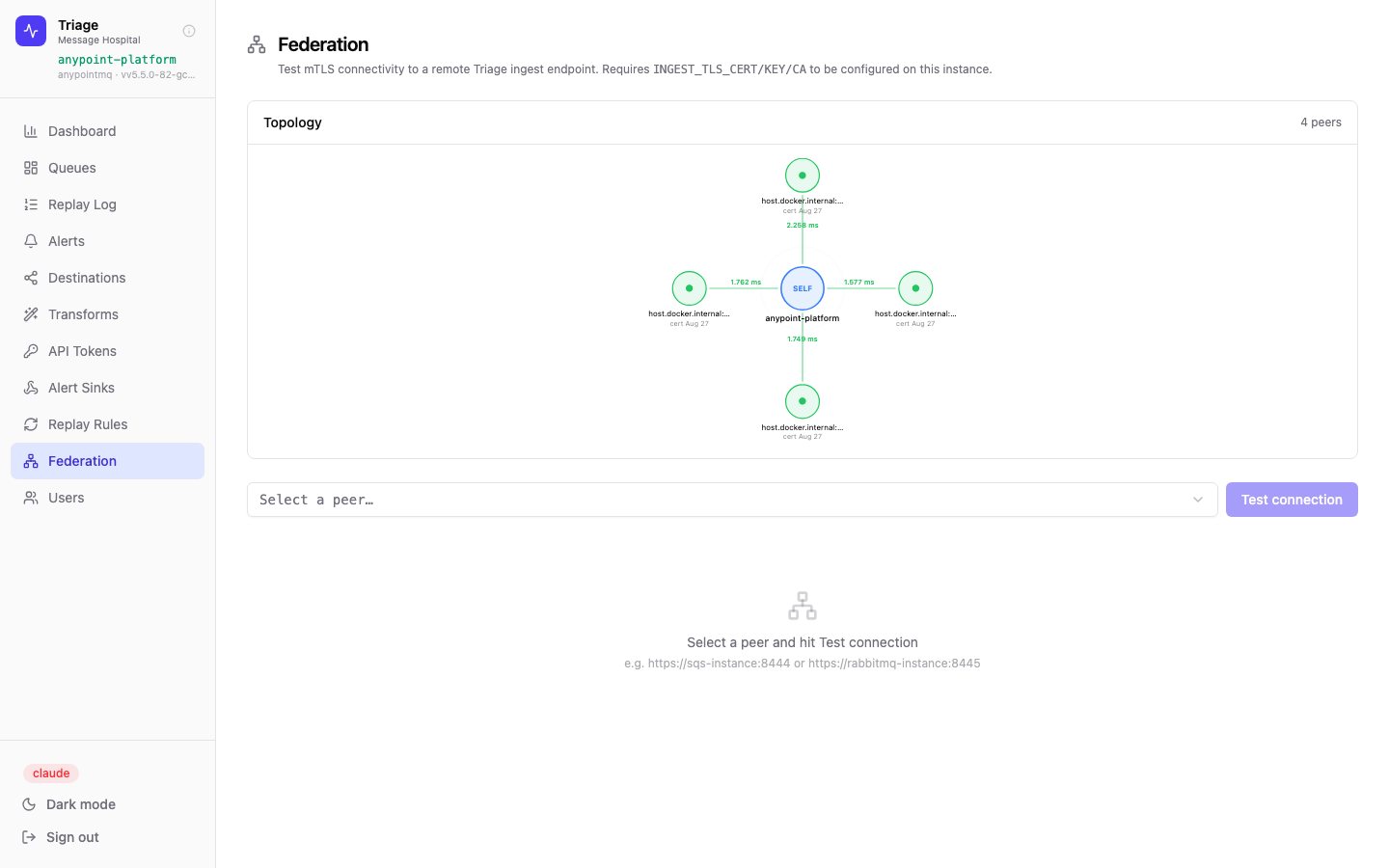
The federation topology view — this instance (anypoint-platform, centre) is peered with 4 other Triage nodes. Connection latency is shown on each edge. Certificates expire Aug 27.
-
🔐Mutual TLS — peer connections use mTLS with certificate-pinned auth. No shared secrets, no VPN required.
-
🌐Topology visualisation — SVG radial graph shows all peers, their labels, certificate expiry dates, and live latency for each connection.
-
📡Health from dashboard — the main dashboard shows peer count and per-peer latency so connectivity issues are surfaced immediately.
-
🔧Test connection — select any peer from the dropdown and run a live connectivity test to verify mTLS handshake and round-trip time.
Live architecture model, ArchiMate export
Triage models itself. A dedicated Architecture view renders the real technology and application landscape of the running instance — and, when federation is configured, every peer — then exports it as a standards-based ArchiMate 3.1 or 3.2 Open Exchange model that drops straight into Archi, BiZZdesign Blue Dolphin, or any compatible tool. Nothing is hand-drawn: the model is generated from live runtime data, so it never drifts out of date.
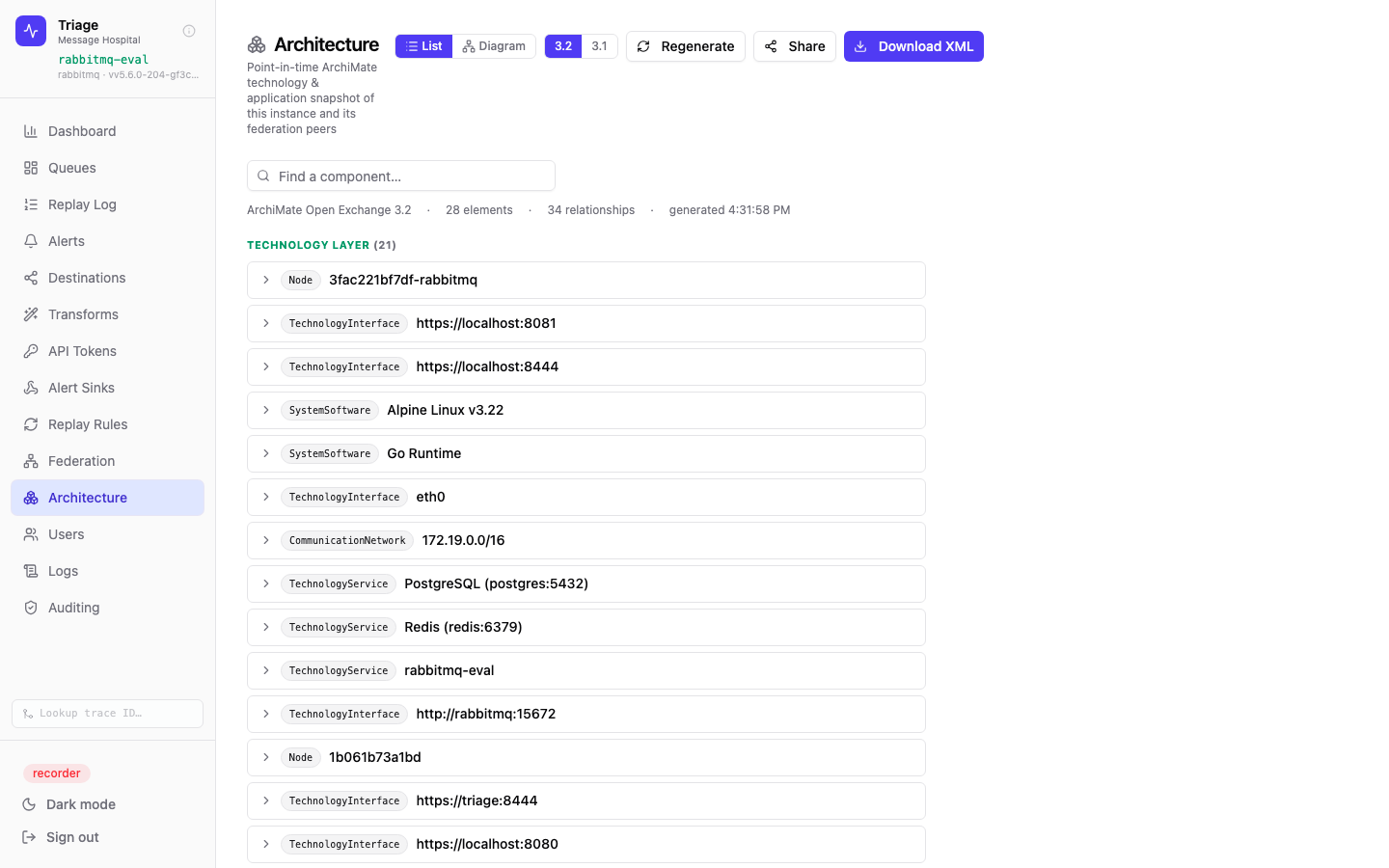
The Architecture view — a point-in-time ArchiMate Open Exchange 3.2 snapshot with 28 elements and 34 relationships, grouped by layer. Toggle between 3.1 and 3.2, regenerate live, share a read-only link, or download the raw XML.
-
🧩ArchiMate Open Exchange export —
GET /api/v1/export/archimate?version=3.2(or3.1) returns standards-compliant XML: host, OS, Go runtime, Postgres/Redis, queue provider and storage endpoints, all as typed technology and application elements. -
🔄Poll on a cadence — schedule the endpoint from cron, a pipeline, or your EA tool's importer to keep an always-current model in Archi or Blue Dolphin. Because it is generated from runtime state, the diagram tracks reality instead of drifting.
-
🌐Federation at full parity — each peer is modeled as its own Node running its artifact, joined by a single Federation Mesh (mTLS) communication network. Shared Postgres/Redis are deduplicated by address so shared-failure domains — blast radius — are explicit.
-
🔧Made for SRE break-fix — on-call opens the model to see exactly what this instance depends on and what it shares with peers, then drops a time-limited read-only share link into the incident channel for architects, support, and engineers.
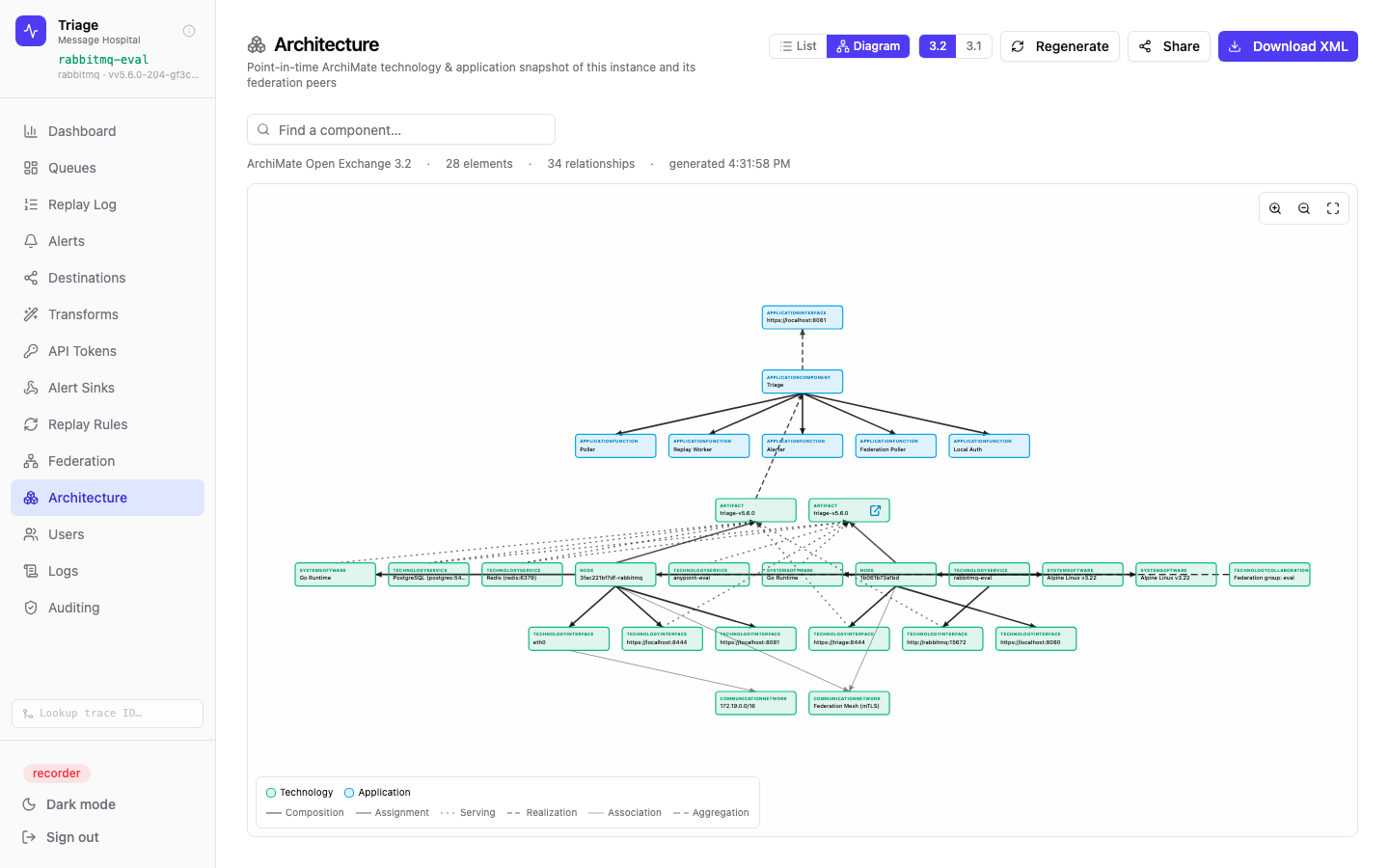
The layered topology diagram — application elements over the technology layer, edges styled by ArchiMate relationship type. Pan, zoom, search, and click any node for its documentation, properties, and relationships. The same model powers the list, the diagram, and the downloaded XML.
One model, three audiences
Enterprise architects get a governed ArchiMate artifact for their repository without chasing screenshots. SREs get an always-accurate current-state map — including cross-instance shared-store blast radius — the moment an incident starts. Engineers and support get a shareable, login-free picture of how the deployment actually hangs together. It is the same live model, rendered for whoever needs it, and it is never out of date because it is generated on request from the running system.
Role-based access, multiple auth providers
Triage supports local accounts, GitHub OAuth, and OIDC alongside four roles: a Viewer → Operator → Admin ladder, plus Developer off to one side for transform authorship. Roles can be derived from an OIDC group claim on every login. Service accounts get API tokens for programmatic access. All user management happens in-app.
Users page showing 8 accounts across Local, GitHub, and OIDC providers. Role badges (Admin/Operator/Viewer), last-login timestamps, and enable/disable toggles give full lifecycle management.
Admin
Full access — manage users, providers, transforms, rules, sinks, and all operational actions.
Operator
Browse queues, inspect messages, replay, and use transforms. Cannot manage system configuration.
Viewer
Read-only access to queues, messages, and replay log. No replay or config changes.
Developer
Authors transforms and nothing else — no replay, no configuration, and no access to message payloads.
Service account
Marked with a service tag — used with API tokens for automated integrations, no login required.
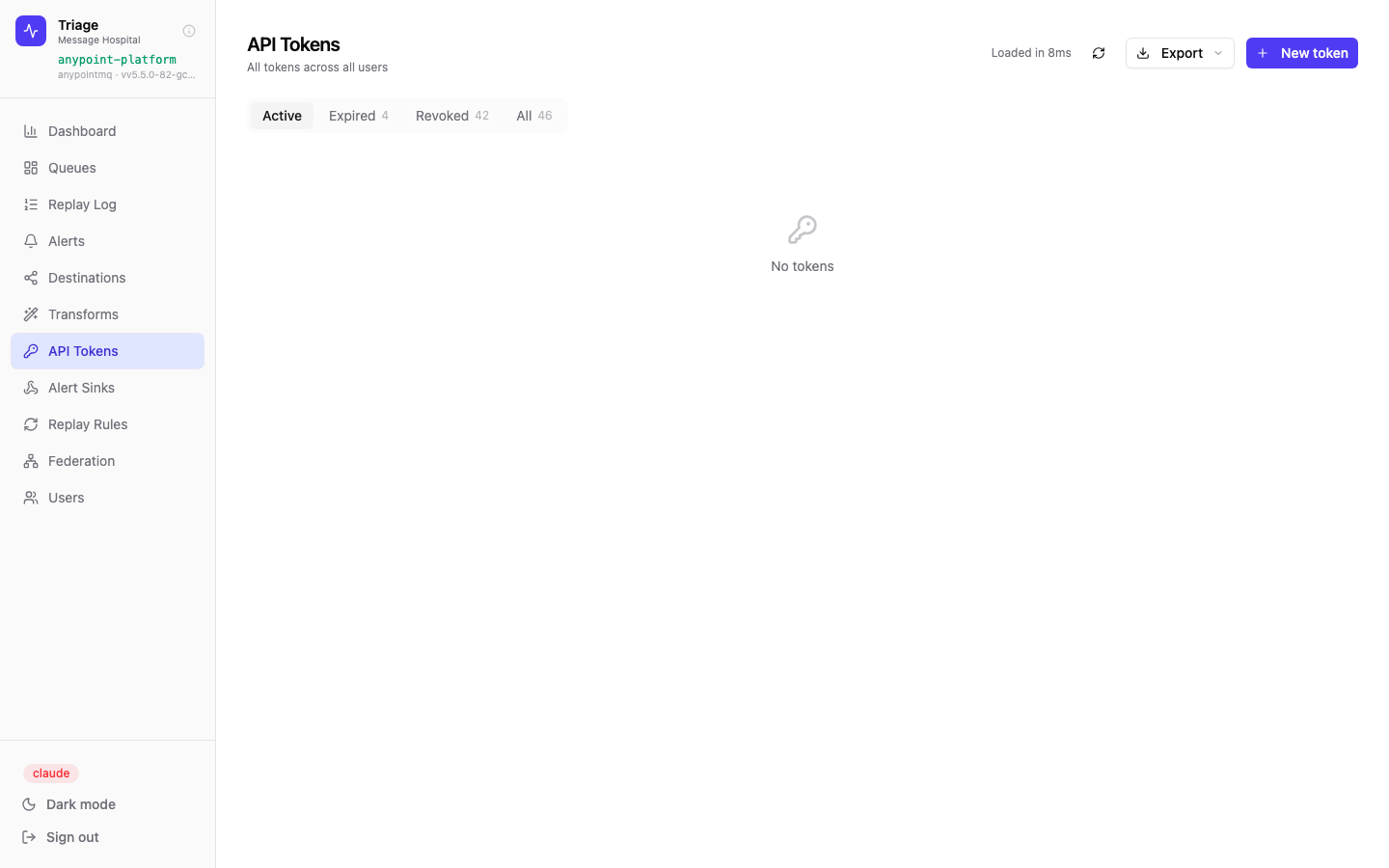
API Tokens page — 46 tokens total (4 expired, 42 revoked) showing a complete lifecycle. New tokens can be scoped and given an expiry date. Tokens are scoped to the issuing user's role.